

You’ve hit your search limit
Start your free trial to keep exploring full traffic and performance insights.
Get StartedAppLock - Time Password análises de aplicativos para 11 de fevereiro

AppLock - Time Password
- Adria Devs
- Google Play Store
- Gratuitos
- Personalização
Are you worried about exposing your PIN while you unlock your apps?
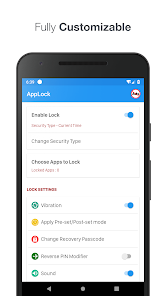
Here comes App Lock - Time Password (Dynamic Password) for the rescue.You can make your phone current time its app lock screen password.And time changes every minute, so does the password too, so no one can even guess it.
★ App Lock (Privacy Protection) can lock Facebook, Whatsapp, Gallery, Messenger, SMS, Contacts, Gmail, Settings, incoming calls and any app you choose. Prevent unauthorised access and guard privacy. Ensure security.
★ Vault(Hide and protect photos & videos): Photos and videos imported into phone can only be viewed after the correct password is entered.
★ Private Browser: With Private browser, your internet surf will leave no traces behind. There is also Bookmark feature.
Features
☆ Customise wallpaper for lock screen - You can apply HD Screen wallpaper or choose from Gallery.
☆ Unlock sound enable/disable.
☆ Unlock vibration enable/disable.
☆ Support Fingerprint
☆ Support Break-in Alerts and know who is trying to break-in
☆ 12 hour and 24 hour format both supported.
☆ 100% safe and secure App Lock- Time Password
☆ Reverse Pin Modifier - Apply Reverse mode of your Current Lock either it is your Current Time, Own Security Pin or Pin+ Current Time.
☆ Minute Pre-Set / Post-Set - Means to give more security now Set Pre-Set or Post Set minute to your Current time.
☆ Hide App Icon - Hide this App icon to surprise your friends where is the App lock. Launch it by dialing #666#6
☆ Choose your own Lock Type - Either you want Current System Time to make your AppLock Password or own custom PIN with different Time slot like Hour only, Minute Only or full time. All are possible by this App.
► Current Time - It is default password of your lock screen. e.g. If the time is 01:47, your PIN will be 0147.
► Pin Passcode - User can choose any password.
► Pin + Minute Passcode - e.g. if you choose digit is 12 and the time is 01:45 your PIN will be 1245.
► Pin + Current Time Passcode - e.g. if your choose digit is 45 and the time is 02:37 your PIN will be 450237.
► Pin + Day Passcode - e.g. if your choose digit is 45 and the date is 4 July 2017 your PIN will be 450407.
► Pin + Hour Passcode - e.g. if you choose digit is 12 and the time is 01:45 your PIN will be 4501.
---FAQ---
☆ How to lock Xiaomi / MI phones?
►Xiaomi / MI phones have different permission management style. To use App Lock - Time Password on Xiaomi / MI phones, please follow the following steps.
1. Open Security App -> permissions.
Choose option permissions -> App Lock - Time Password -> Allow all the permissions.
2. Go back to Permissions -> Auto Start -> Allow App Lock - Time Password to Auto Start.
►IMPORTANT NOTE FOR HUAWEI USERS
Huawei devices have task killer services that interfere with the AppLock service. For our app to work, you need to add App Lock - Time Password to allowed apps in those devices' security settings.
Huawei: Phone Manager App > Protected Apps > Add App Lock - Time Password to the list.
☆ Explanation for the permissions:
android.permission.INTERNET
android.permission.READ_PHONE_STATE
android.premission.ACCESS_NETWORK_STATE
AD company need read phone state and network state to display and improve there AD quality.
android.permission.SYSTEM_ALERT_WINDOW : to lock screen
android.permission.RECEIVE_BOOT_COMPLETED : To lock device as soon as it restarts
android.permission.CAMERA : Image capture for App lock wallpaper
android.permission.READ_EXTERNAL_STORAGE : For change App lock wallpaper
★ IMPORTANT: Do not uninstall this app before restoring your personal files otherwise it will be lost forever.
App Lock - Time Password will not collect your any information.
AppLock - Time Password classificação de uso
A classificação de uso é baseada no algoritmo da Similarweb que calcula as instalações atuais e os usuários ativos ao longo de um período de 28 dias.
Todas as categorias em
Estados Unidos--
Personalização em
Estados Unidos--
Interesses dos Usuários e Principais Categorias
Principais categorias e aplicativos usados pelos usuários do AppLock - Time Password
Principais Categorias
Afinidade
Principais Aplicativos Dentro da Categoria
19%


15%

13%


13%


Principais concorrentes e aplicativos alternativos
Aplicativos com alta probabilidade de serem usados pelos mesmos usuários, da mesma loja.

Calculator Hide Files

LockMyPix Photo Vault PREMIUM

Gallery – Photos & Videos

Calculator Lock - Hide Photo
 AppLock - Time Password VS.
 fevereiro 11, 2026