

You’ve hit your search limit
Start your free trial to keep exploring full traffic and performance insights.
Get StartedFUJIFILM Camera Remote análises de aplicativos para 6 de fevereiro
FUJIFILM Camera Remote
- FUJIFILM Corporation
- Google Play Store
- Gratuitos
- Fotografia
The FUJIFILM Camera Remote is an application provided by FUJIFILM that can operate wireless-equipped digital cameras by remote control to shoot images and to view images and movies in the camera and to transfer them to smartphones or tablets. And it also supports the cameras that offers Bluetooth® capability. Pair it with your smartphones or tablet devices, it synchronizes "date and time" and/or "location information" of your smartphone or tablet devices with the cameras that offers Bluetooth® capability. In advanced of shooting, to easily transfer pictures you have taken to the smartphones or tablet device via this application. Bluetooth wireless remote shutter release can be used for cameras that offers Bluetooth® capability. In addition, firmware update is now supported from your smartphone or tablet devices via Bluetooth without the need of a SD memory card.
【To customers who is using Android 6.0 or later】
If you are using Android 6.0 or later, enable location services.
1. To enable location services on your Android device, go to Settings > Location.
2. To enable location services for the app, go to Settings > Apps > Camera Remote > Permissions > Location.
[Features]
-This application provides the following functions:
1. Transferring images and movies to a Smartphone
2. Browsing the Camera from a Smartphone
3. Downloading Location Data from a Smartphone
4. Shooting Images by Remote Control(*)
5. Easily transfer pictures from the cameras that offers Bluetooth capability.
6. Synchronizing "date and time" and/or "location information" with the cameras that offers Bluetooth capability
7. Firmware update via a Smartphone to the cameras that offers Bluetooth capability.
8. Bluetooth wireless remote control camera shutter release is now supported for cameras that offers Bluetooth capability.
*How to change the setting depends on your camera.
* If the LOCATION setting is OFF, a smartphone cannot be connected to a camera in some cases.
Change the two LOCATION settings in the smartphone and the Camera Remote application softwaere
to ON. For detail, visit the FAQ website below.
▼FAQ →http://digital-cameras.support.fujifilm.com/app/answers/detail/a_id/19483/kw/Android
[Supported cameras and supporting functions]
[Supporting functions: 1, 2, 3, 4, 5, 6, 7, 8]
FUJIFILM GFX100 II, GFX100, GFX100S, GFX50S II, GFX 50R, X-H2S, X-H2, X-H1, X-Pro3, X-T5, X-T4, X-T3, X-T30 II, X-T30, X-T200, X-S10, X-E4, X-E3, X100VI, X100V, X-A7, XF10
[Supporting functions: 1, 2, 3, 4, 5, 6, 8]
FinePix XP140
[Supporting functions: 1, 2, 3, 4, 5, 6]
FUJIFILM X-T100, X-A5
FinePix XP130
[Supporting functions: 1, 2, 3, 4]
FUJIFILM GFX 50S, X-Pro2, X-T2, X-T1, X-T20, X-T10, X-E2S, X-E2(firmware version 3.00 or later), X70, X30, X100F, X100T, X-A10, X-A3,
FinePix XP120, XP90, XP80, S9950W, S9900W
[Supporting functions: 1, 2, 3]
FUJIFILM X-E2(firmware version 1.00-2.10), XQ2, XQ1, X-A2, X-A1, X-M1
[Smartphone System Requirements]
Android Smartphone/Tablet
Android OS Ver5.0 - 11
*This application software doesn't guarantee the functions for all the Android smartphones.
[How to use "Send Email to Us"]
1.When the email window is launched, click "Send" without the title and description changed.
2.The link to "Contact Us" website will be sent to you.
3.Please send your inquiries and messages to us via the website.
Thank you for your cooperation.
Please use your camera with the latest firmware when using the FUJIFILM Camera Remote App.
Please visit the FUJIFILM website for instructions and to download the latest firmware.
http://www.fujifilm.com/support/digital_cameras/software/
Please Visit FUJIFILM Web pages for more details and usage.
http://app.fujifilm-dsc.com/en/camera_remote/index.html
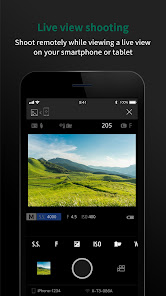
FUJIFILM Camera Remote classificação de uso
A classificação de uso é baseada no algoritmo da Similarweb que calcula as instalações atuais e os usuários ativos ao longo de um período de 28 dias.
Todas as categorias em
Alemanha--
Fotografia em
Alemanha#206
Interesses dos Usuários e Principais Categorias
Principais categorias e aplicativos usados pelos usuários do FUJIFILM Camera Remote
Principais Categorias
Afinidade
Principais Aplicativos Dentro da Categoria
Mais aplicativos
24%


12%





11%




10%


Principais concorrentes e aplicativos alternativos
Aplicativos com alta probabilidade de serem usados pelos mesmos usuários, da mesma loja.
Canon Camera Connect

Sony | Imaging Edge Mobile

Insta360
Camera FV-5 Lite
FUJIFILM Camera Remote VS. fevereiro 6, 2026