

Folder Camera análises de aplicativos para 3 de dezembro

Folder Camera
- FingerTory
- Google Play Store
- Gratuitos
- Produtividade
If you create a desired folder such as family, friends, lovers, food, etc. and take a picture using the notification bar folder camera, the photo will be automatically saved in that folder.
This app helps you categorize your photos the moment you take them.
This app is not a photo viewer app.
This app helps you connect the folder you want to classify to the notification bar (status bar/top bar) of your smartphone in advance, and then take pictures using the default camera app on your phone and save them directly to the folder.
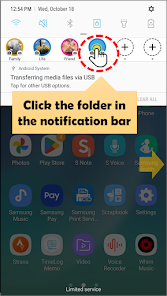
Anytime, anywhere, just pull down the notification bar and select the desired folder. The camera will automatically start and the photos will be saved in the selected folder.
Instead of going through the hassle of sorting, select the folder where the photos will be saved the moment you launch the camera and sort them.
[How to use]
※ When taking camera photos, use the basic camera app on your smartphone.
1. Create the desired folder in advance. (Use explorer or file manager)
(Internal storage > Pictures > NotiBarFolderCamera > "New folder")
2. Run the app and connect the folder.
3. Register the connected folder in the notification bar (status bar).
4. Open the notification bar and click on a folder anytime, anywhere to take a photo or view a photo.
5. When you complete taking photos, they are automatically saved in the selected folder.
※ Privacy Statement
https://sites.google.com/view/foldercamera/home/privacy-policy
※ Permissions to use
1. Use READ_EXTERNAL_STORAGE permission.
. Access to select a folder to save captured photos
. Access to view photos saved after shooting
2. Use the WRITE_EXTERNAL_STORAGE permission.
. Used to create a folder to store taken photos
. Used to move taken photos from the app's internal space to external storage.
3. Use CAMERA permission.
. Used to take photos through functions within the app or functions registered in the notification bar
4. Use AD_ID permission.
. Used to display advertisements (Google AdMob) within the app
5. Enable READ_MEDIA_IMAGES permission.
. Used to access photos taken by the user
6. Use the POST_NOTIFICATIONS permission. (Applies to Android 13 and above)
. Used to register notifications for immediately taking pictures or viewing photos in the notification bar area.
Folder Camera classificação de uso
A classificação de uso é baseada no algoritmo da Similarweb que calcula as instalações atuais e os usuários ativos ao longo de um período de 28 dias.
Todas as categorias em
Estados Unidos--
Produtividade em
Estados Unidos--
Principais concorrentes e aplicativos alternativos
Aplicativos com alta probabilidade de serem usados pelos mesmos usuários, da mesma loja.

ChordLab

Data Transfer

Quick Image Changer

Murror AI
 Folder Camera VS.
 3ezembro d, 2025