

PDF Editor - Edit & Sign Docs análises de aplicativos para 2 de dezembro
PDF Editor - Edit & Sign Docs
- Offiwiz
- Google Play Store
- Gratuitos
- Produtividade
PDF Editor - Sign PDF, Create PDF & Edit PDF
Sign, edit, read, create, draw, protect and modify any PDF file
PDF Editor - Sign PDF, Create PDF & Edit PDF is a document editor that allows you to edit PDF. It is also a PDF Reader to read PDF. Choose the PDF to edit and modify your PDF in a thousand ways: draw, write on PDF, paint, password, PDF reader, bookmarks, notes, signatures and much more thanks to the best free PDF editor for smartphones.
PDF Editor - Sign PDF, Create PDF and Edit PDF has the following characteristics:
- Sign PDF:
You can add and save your signature to edit and sign your PDF. Leave your signature in your PDF writer. Write your signature and save it to be able to sign future PDFs with a single click.
- Notes:
Add notes to your PDF files, PDF Editor has a document and note editor to annotate the most important parts of your edited PDF file.
- Paint and draw lines and shapes:
Use the pencil to draw lines in the PDF, select the color and edit the PDF drawing lines and shapes. Point out annotations, draw arrows, make squares, write on PDF as if it were a word file or an image.
- Text editor:
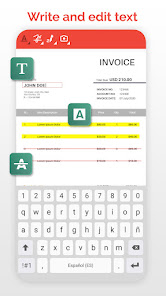
Built-in text editor to underline or cross out the text of your PDF. Edit PDF by writing text and then you can highlight, underline or cross out the words you want.
- Stamps:
New way of sign PDF with the most important messages. Edit PDF with a customizable stamp with the date and time. Perfect to review PDF.
- Bookmark:
You can put bookmark in your PDF documents to mark where you were reading your PDF or editing your PDF. Very useful to read PDF books. Easy and simple PDF reader.
- Photos and images:
Add photos and images to your PDF, you can choose the photo from the gallery or take pictures with the camera to add the image to the PDF with the size and shape you want.
- Create PDF:
Create your PDF document, choose paper size, folio color and if you have guide lines, you can generate PDF and edit PDF documents to your liking thanks to the powerful pdf writer.
- Password: Protect PDF documents is easy and fast with this application because you can put a password to the documents to block PDF and that can only be unlocked with the password that you put.
- Share your files with other tools and applications:
Share the documents you have converted with any other messaging application, mail or social network. Complete your work with PDF Manager or PDF Converter and finish completing the application with the best tools.
The best free PDF office tool to create PDF, edit PDF and modify PDF. endless editing possibilities. Edit PDF in many ways: use the pen to draw lines in the PDF, add text to the PDF, sign the PDF, underline text in PDF and more PDF editing options. Do you want to protect a PDF with a password? Add your signature to the PDF? Everything is possible with this free PDF Creator & Editor. Fill PDF forms without using a PC, a PDF reader with bookmarks to read books on your device.
PDF Editor - Edit & Sign Docs classificação de uso
A classificação de uso é baseada no algoritmo da Similarweb que calcula as instalações atuais e os usuários ativos ao longo de um período de 28 dias.
Todas as categorias em
Estados Unidos--
Produtividade em
Estados Unidos#2,637
Interesses dos Usuários e Principais Categorias
Principais categorias e aplicativos usados pelos usuários do PDF Editor - Edit & Sign Docs
Principais Categorias
Afinidade
Principais Aplicativos Dentro da Categoria
Mais aplicativos
41%


15%




10%



8%

Principais concorrentes e aplicativos alternativos
Aplicativos com alta probabilidade de serem usados pelos mesmos usuários, da mesma loja.

PDF Reader(KDAN PDF): Edit PDF

Mobi PDF・Editor・Scanner・Reader

pdfFiller Edit, fill, sign PDF

SignNow: Sign & Fill PDF Docs
PDF Editor - Edit & Sign Docs VS. 2ezembro d, 2025