

My Contacts - Backup&Transfer análises de aplicativos para 4 de janeiro
My Contacts - Backup&Transfer
- Telenor Norway
- Google Play Store
- Gratuitos
- Comunicação
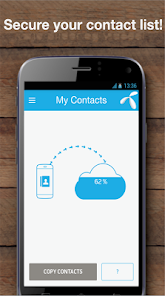
My Contacts App helps you to backup, restore and save all your precious contacts! Also, you can easily transfer all your contacts from one phone (Android / iPhone / feature phones) to another phone with just one tap! My Contacts can also backup your SMS so that they are safe and accessible from any of your devices. It’s an easy app that keeps your contacts and SMS safe and secure!
The easiest and the only contact saving app that supports both smart & feature phones! You can even access your phonebook from anywhere using our web interface www.mycontacts-app.com , where you can merge/remove the duplicate contacts and create a clean contact list!
→ Your contacts are saved! even if you lose or break your phone!
→ Easiest way to Secure your contacts - Just One Tap
→ Backup, restore to ANY(!) Smart-phone without any worry. Completely safe, secured and fast.
→ Keep you SMS safe and accessible from any of your devices with the SMS backup option
★☆★ Features ★☆★
→ Safe & secure contact backup.
→ SMS Backup - Let's you backup your SMS and makes then easily accessible from any of your devices.
→ Auto sync option, makes it easier. Just keep the app running in the background and it will take a daily backup of your contact list. Or you can manually sync with the Sync now button.
→ Small in app size with very low data usage (in kbps)
→ Easy Transfer of contacts from one mobile handset to another.
→ Simple and to the point app and it does as it says!!
Have you ever lost or broke your phone and lost all your contacts and SMS? Worried how to contact them back and find their numbers??
We have a solution for you!
Now you don’t need to worry about losing contact numbers and SMS of your loved ones! Whether you want to factory reset your current mobile, Lost or broke your phone, upgrading to new mobile or switching from Android to iOS, just download My Contacts App will make sure that you get all your precious contacts back with you forever!
★☆★ This is how it works: ★☆★
→ how to backup your contact list and SMS:
1. Download the My Contacts app on your phone
2. Create account by sign up or Login if you already have an account
3. Press ”Copy contacts” in the app
3. Your contacts are now safely stored!
4. Activate SMS backup and let the app keep your SMS safe
→ How to Transfer contact list from one phone to another:
1. Download the My Contacts app on your OLD and NEW phones
2. Signup or Login with your id on the OLD phone
3. Press ”Copy contacts” on your OLD phone
4. Now, Signup / Login on the NEW phone
5. Then press ”Copy contacts” on your NEW phone – Voila!! it’s done!
You can edit your contact list easily on the web at https://www.mycontacts-app.com
My Contacts holds the FOREGROUND_SERVICE permission. If the user allows to exclude us from battery optimizations, we utilize a foreground service for core features such as looking up phone numbers from incoming calls and safely sync your contacts regularly, even if the app isn’t being used in the foreground at the time. When we do this a notification is visible to inform the user. Most of the time it’s a very short time with a minimal effect on the battery.
Customer Care:
We love to hear from you – so feel free to contact us at: http://support.mycontacts-app.com/
For iPhone / iPad version:
https://itunes.apple.com/no/app/my-contacts-app/id847332579?mt=z
(Take backup from iPhone / iPad and restore on Android device)
"Contacts Transfer Web Tool”
If you have an old phone, try out our "Contacts Transfer Web Tool” at https://www.mycontacts-app.com
Supported Languages:
My Contacts App is available In English, Serbian, Swedish, Thai, Bangla, Malay, Burmese. More localized translations are coming soon!
My Contacts - Backup&Transfer classificação de uso
A classificação de uso é baseada no algoritmo da Similarweb que calcula as instalações atuais e os usuários ativos ao longo de um período de 28 dias.
Todas as categorias em
Estados Unidos--
Comunicação em
Estados Unidos--
Interesses dos Usuários e Principais Categorias
Principais categorias e aplicativos usados pelos usuários do My Contacts - Backup&Transfer
Principais Categorias
Afinidade
Principais Aplicativos Dentro da Categoria
52%


31%

6%


5%


Principais concorrentes e aplicativos alternativos
Aplicativos com alta probabilidade de serem usados pelos mesmos usuários, da mesma loja.

Verizon Call Filter

Quick Bill Admin

Sandals & Beaches Resorts

Enpass Password Manager
 My Contacts - Backup&Transfer VS.
 janeiro 4, 2026