

4 Aralıkiçin GIMP uygulama analizi

GIMP
- UserLAnd Technologies
- Google Play Store
- Ücretliler
- Sanat ve Tasarım
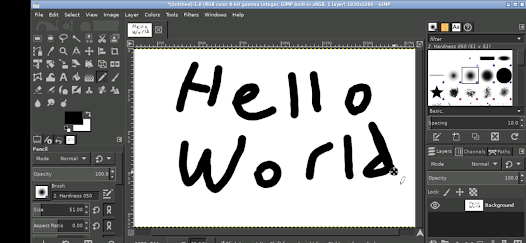
This really is GIMP, the amazingly capable GNU Image Manipulation Program, running on your device. It is full featured and professionally supported.
Features of GIMP:
GIMP has too many feature to list here. Please checkout the GIMP site: https://www.gimp.org/about/introduction.html
The short version of this, is that it has everything you would want from a professional photo and image editing and authoring program.
How to use this GIMP Android app:
Use it just like normal. But here are some specifics to the Android interface.
* Tap with one figure to left click.
* Move mouse by sliding around one finger.
* Pinch to zoom.
* Press and hold and then slide one finger to pan (useful when zoomed in).
* Slide two fingers up and down to scroll.
* If you want to bring up a keyboard, tap on the screen to get a set of icons to appear and then click the keyboard icon.
* If you want to do the equivalent to a right click, tap with two fingers.
* If you want to change the desktop scaling, find the service android notification and click the settings. You have to stop and restart the app after changing this settings for it to take effect.
This is all easier to do on a tablet and with a stylus, but it can be done on a phone or using your finger as well.
To access files from the rest of Android, there are many useful links in your home directory (/home/userland) to places like your Documents, Pictures, etc. No need to import or export files.
If you don't want to, or cannot pay the cost of this app, you can run GIMP via the UserLAnd app.
Licensing:
This app is released under the GPLv3. The source code can be found here:
https://github.com/CypherpunkArmory/gimp
The icon, Wilber, the GIMP mascot, comes from a vector image source (SVG) made available by Jakub Steiner, available as Creative Commons by-sa 3.0.
This app is not created by the main GIMP development team. Instead it is an adaptation that allows the Linux version to run on Android.
GIMP kullanım sırası
Kullanım sıralaması, Similarweb'in 28 günlük bir süre boyunca mevcut yüklemeleri ve aktif kullanıcıları hesaplayan algoritmasına dayanmaktadır.
Tüm kategoriler içinde
Amerika Birleşik Devletleri#686
Sanat ve Tasarım içinde
Amerika Birleşik Devletleri#8
Kullanıcıların İlgi Alanları & En İyi Kategoriler
0}GIMP kullanıcıları tarafından kullanılan başlıca kategoriler ve uygulamalar
En Popüler Kategoriler
Yakın ilgi alanı
Kategorideki En Popüler Uygulamalar
Daha fazla uygulama
30%



20%





18%





11%




En İyi Rakipler & Alternatif Uygulamalar
Aynı mağazadan, aynı kullanıcılar tarafından kullanılma olasılığı yüksek olan uygulamalar.
Adobe Capture: Illustrator,Ps

Adobe Express (Beta)

Photo Editor by BeFunky

VistaCreate: Graphic Design
GIMP VS. Aralık 4, 2025