

1月9日 的 Book Collect - reading record 應用程式分析

Book Collect - reading record
- Kenji Minoshima
- Apple App Store
- 免費版
- 書籍
How many volumes of this book have you had?
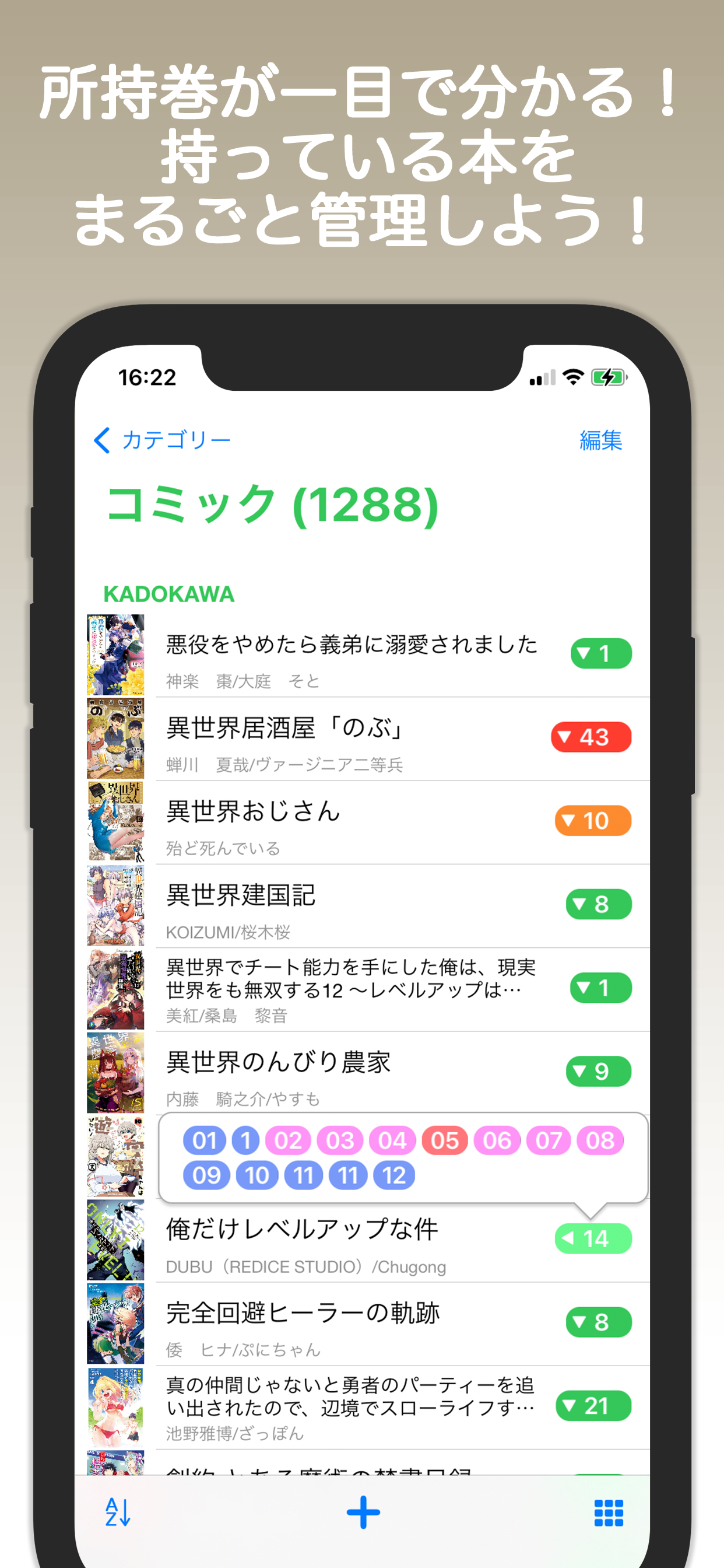
It is an application that you can see the possession volume of the book at a glance.
Take control of all the books you own!
■ Main functions
・You can create bookshelves with your favorite titles categorized by genre, and keep volumes like Volume 1, Volume 2, etc. organized together.
・Tapping on the numbers of the bookshelf will display a speech bubble with a list of the volumes you own.
・Automatic sorting based on title, author, publisher, and release date is available, as well as manual sorting.
・You have the freedom to change book cover images from albums, photos, or web searches.
・Book information can be automatically filled in by searching. It also supports barcode scanning and manual input.
・You can view book rankings to discover new books you may be interested in.
・You can track your reading progress (want to read, in the reading pile, currently reading, read) and add ratings and reviews.
・Graphs showing the dates of book additions and completion are available.
■ Add books
When you launch it, there is a + button at the bottom.
You can add books with a tap. If you select a category first, the book will be added to that category.
If you want to put the book in the specified bookshelf, select the bookshelf in "Select a bookshelf" or add a new one.
For Title Name, enter the title of the book.
If you've selected a bookshelf, just enter the volume number.
(To search by bookshelf name + title name)
If you search for a book with "Search" and select it, the content will be automatically entered.
If no bookshelf is selected, a bookshelf will be created automatically.
(If you select a category first and then add a book, a bookshelf will be created within that category.)
If you search without entering "Search", the sales ranking will be displayed.
If you enter the conditions, a recommended search will be performed.
"+" manually enters books into the selected bookshelf.
You can also search for a book by its barcode and enter it.
When searching, if you select a bookshelf first, batch registration is possible.
Bulk registration with "Add" will add the title number to the specified number all at once.
■ Add category
After pressing "Edit" on the category screen, you can add a category by pressing "+".
You can also change the settings by selecting a category while editing.
(The setting can also be changed in the long-press menu.)
■ Add a bookshelf
Select a category to display the bookshelf.
After pressing "Edit", you can add a bookshelf with "+" at the bottom.
Also, when displaying the list, you can change the settings of the bookshelf by selecting the bookshelf while editing.
(The setting can also be changed in the long-press menu.)
The icon at the bottom right of the bookshelf switches between list view and icon view.
During editing, batch deletion and batch category change are possible.
■ Bookshelf setting
○Management method
・Comics
For serialized comics. If the book title has a volume number, the bookshelf will be created with the title name. The books will be collected on the bookshelf by that title, and the name of the book will be only the volume number.
·author
For paperbacks and novels. If there is no volume number and there is an author, a bookshelf will be created with the author's name. Collect books on the author's bookshelf.
·others
Other books will be miscellaneous. You can add books freely.
* The bookshelf when adding a search is created according to the above rules.
* When adding a search, if the bookshelf only has the title name option, books without volume numbers will be other.
○ Search genre
Search by genre.
If you select all, you can search regardless of genre. However, I cannot obtain kana.
○ Bookshelf image
The default is set to the latest volume. You can select a book and set it as the image of the bookshelf.
If you have a book set as your bookshelf image, you can unset it here.
商店排名
商店排名基於Google和Apple設定的多個參數。
所有類別 在
美國--
書籍 在
美國--




 Book Collect - reading record VS.
 1月 9, 2026