

1月18日 的 Notes Basic 應用程式分析

Notes Basic
- Yudai Abe
- Apple App Store
- 免費版
- 生產力
■ "Note List" Screen
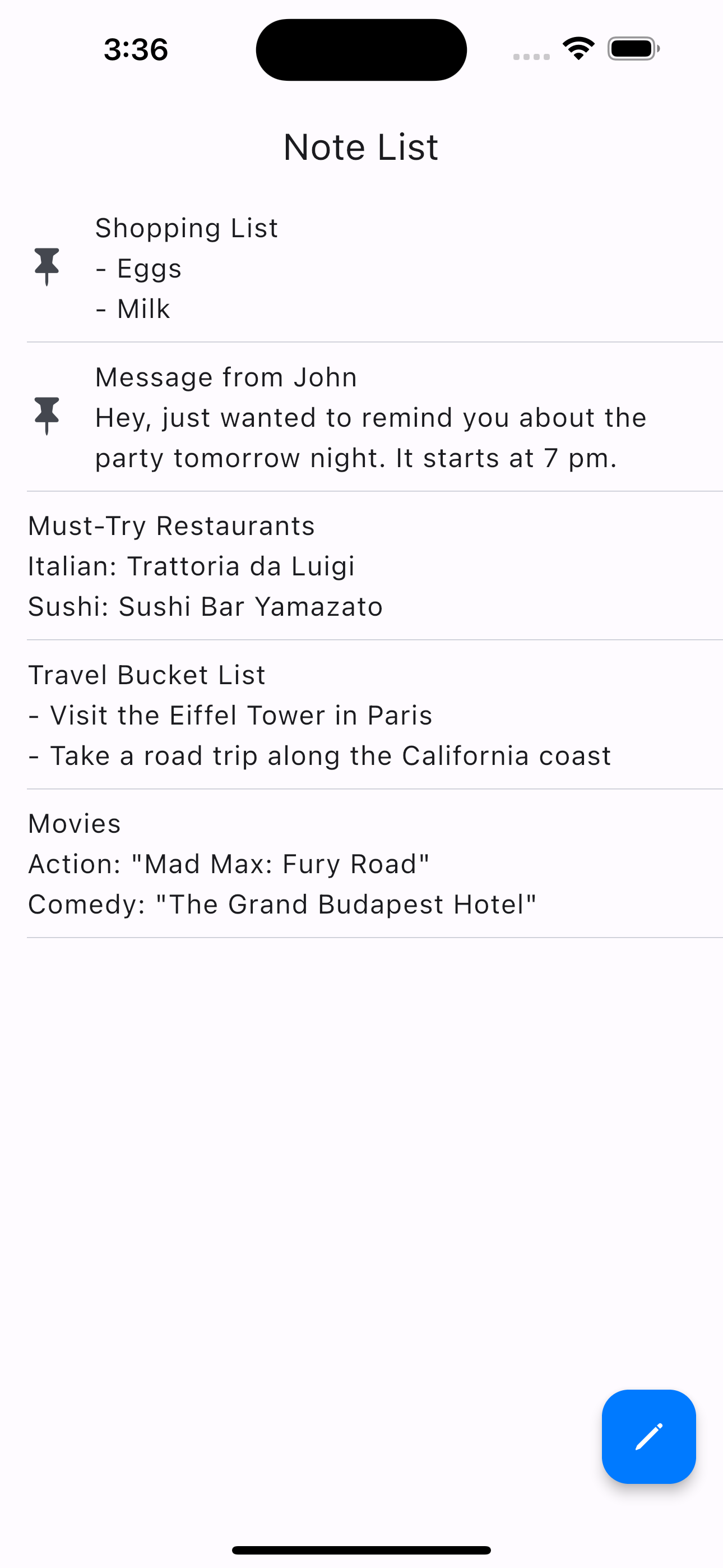
The screen displays a list of saved notes.
When you edit a note, it will automatically appear at the top of the list.
■ Add a note
1. Tap the button at the bottom right of the "Note List" screen.
2. After editing on the "Add a New Note" screen, tap the button at the bottom right to save.
*If you go back with a swipe, changes will not be saved.
■ Edit a note
1. Tap the note you want to edit on the "Note List" screen.
2. After making changes on the "Edit the Note" screen, tap the button at the bottom right to save the changes.
*If you go back with a swipe, changes will not be saved.
■ Pin/unpin a note
When you pin a note, it will remain at the top of the "Note List" screen.
Pinned notes will show a pushpin icon.
1. On the "Note List" screen, swipe to the right on the note you want to pin.
2. An orange pin icon button will appear, so tap it.
* To unpin a note, perform the same action.
■ Delete a note
1. On the "Note List" screen, swipe to the left on the note you want to delete.
2. A red trash can icon button will appear, so tap it.
3. A confirmation message will appear, so tap "Delete Note."
* Deleted notes cannot be restored.
商店排名
商店排名基於Google和Apple設定的多個參數。
所有類別 在
美國--
生產力 在
美國--



 Notes Basic VS.
 1月 18, 2026