

You’ve hit your search limit
Start your free trial to keep exploring full traffic and performance insights.
Get StartedCropSize: Image Resizer Editor app analytics for January 29

CropSize: Image Resizer Editor
- Aliaksei Khutarshchykau
- Apple App Store
- Paid
- Photo & Video
CropSize is your go-to app for precise image resizing and editing. Make your photos the perfect size, composition, and quality for photo library, social media, and various projects. Enhance results with accurate color adjustments and properly crafted metadata. Automate the entire editing process with batch processing and workflows. Share and print your creations in the right format and dimensions. All these tasks are easily achievable with CropSize—an excellent addition to your photo editing toolkit!
As an essential element of your editing arsenal, CropSize plays a distinctive role as it allows to specify exact sizes and positions for image crop and resize, where other apps offer only approximate solutions. It also provides detailed information throughout the editing process, making your experience more transparent and intuitive. Additionally, the app's ability to operate in various units of measurement can notably streamline your workflows.
With these comprehensive features, CropSize ensures you have the control you need to achieve your editing goals:
PHOTO CROP
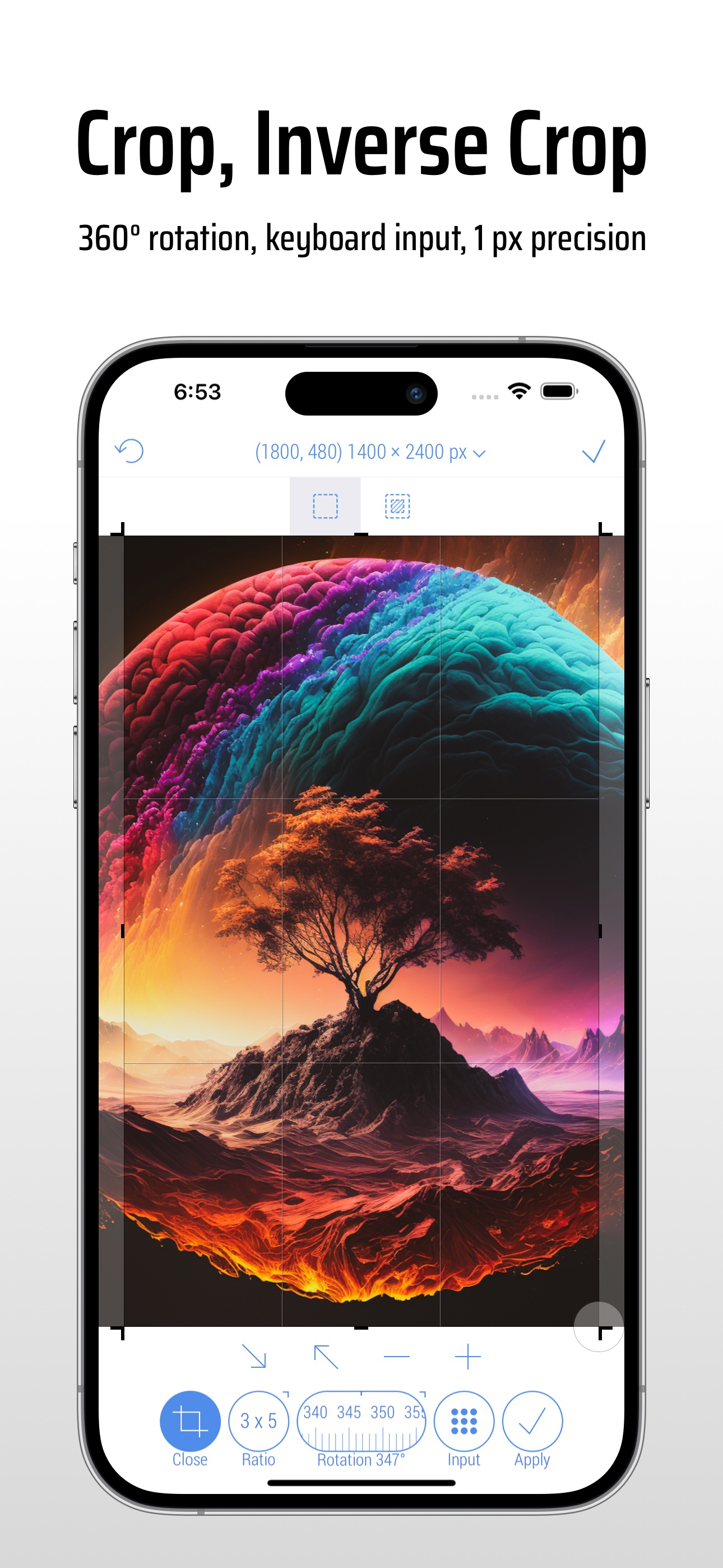
• Crop photos in Standard and Inverse Crop modes, using pixels, inches, centimeters, or percentages
• Adjust the size and position of the crop frame using gestures or by entering values on the keyboard
• Rotate images smoothly within a 0-360° range with a slider or specify rotation angle via keyboard (Long press slider)
• Change the crop aspect ratio using customizable presets (Long press Ratio button)
• Adjust the crop position and size by one pixel in correction mode (Tap a marker)
• View crop-specific image details, including size, position, rotation, and estimated file size
IMAGE RESIZE
• Resize images in Stretch, Insert, Clip, and Canvas Size modes, using pixels, inches, centimeters, or percentages
• Specify exact image size via the keyboard or customizable presets, up to 9000 x 9000 pixels (81 megapixels)
• Resize proportionally with a percentage slider or specify the relative size via the keyboard (Long press slider)
• Adjust position using gestures and one-pixel corrections for Insert, Clip, and Canvas Size modes
• Preview changes in actual size
• View resize-specific image details, including size, offset, and estimated file size
PHOTO FILTER
• Apply any combination of photo filters and effects, including Chrome, Bloom, Vignette, Sepia, Sharpen, Blur, and more
• Adjust filter intensity using a slider or horizontal on-screen gestures
• View changes Before / After using two-finger gestures
BATCH PROCESSING & WORKFLOWS
• Edit multiple photos simultaneously, applying the same combinations of crop, resize, color, orientation, and metadata changes to all of them
• Use workflows by saving entire editing sessions as reusable Programs on the History screen, and accessing them from the Load screen
• Edit up to 50 photos shared with CropSize from other apps or the Photo Library
PHOTO METADATA
• View image details on the Load and Metadata screen
• Update photo DPI and creation date
• Provide information and copyrights using up to 25 fields of IPTC metadata
• Remove original GPS, EXIF, TIFF, and JFIF details from your photos
• Create and manage multiple metadata profiles for better organization
IMAGE ORIENTATION:
• Flip and rotate images using one-finger swipe gestures on the Main and Batch Processing screen
SHARE AND PRINT:
• Choose export formats: Auto, PNG, TIFF, JPEG, and HEIC, with compression quality for JPEG and HEIC
• Specify metadata settings using one of your previously created metadata profiles
• Configure export filenames using original values, custom entries, or filename patterns
• Save images to the Photo Library, automatically organizing Results and Originals into a convenient album structure
• Print multiple photos on A4, Letter, and other page sizes using exclusive “Print Plus” option from sharing menu
GUIDES
• Explore our step-by-step guides: https://www.cropsize.com/guides
• Watch the video overview of main features: https://vimeo.com/188002923
Store Rank
The Store Rank is based on multiple parameters set by Google and Apple.
All Categories in
United States--
Photo & Video in
United States#215
Top Competitors & Alternative Apps
Apps with a high probability of being used by the same users, from the same store.

eZy Edit: Batch Photo Editor

Vintage Scene

Distressed FX : Plus

Dramatic Black & White
 CropSize: Image Resizer Editor VS.
 January 29, 2026