

1月31日 的 CalcNotePlugin for Drive 應用程式分析

CalcNotePlugin for Drive
- burton999 calculator developer
- Google Play 商店
- 付費
- 生產力
This plugin allows you to automatically backup your files and drafts to Drive.
CalcNote
https://play.google.com/store/apps/details?id=com.burton999.notecal
CalcNote Pro
https://play.google.com/store/apps/details?id=com.burton999.notecal.pro
How to use
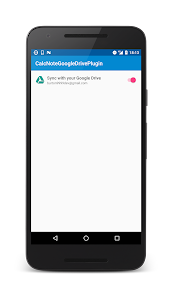
1. Launch the CalcNote for Drive.
2. Enable [Sync with your Drive]
3. Select your account.
4. Sign in to your account.
Specification
This plugin creates "__calcnote__" folder to your drive root folder.
All of your files and drafts are saved in this folder.
Also plugin creates "trash" folder in the "__calcnote__" folder.
All for your deleted files and drafts are saved in the "trash" folder.
Note
1. When used on multiple devices, A file created by device A are automatically synchronized to device B. File updates and deletes are also synchronized.
2. This plugin is intended to provide automatic backup. It does not provide accurate synchronization function.
3. Plugin resolves an update conflict based on device time. So if the time of the device is not accurate, it will result in unintended consequences.
4. A file created by another application is not synchronized. If you create text file using Drive app and save file to "__calcnote__" folder, file is ignored by this plugin.
5. Plugin does not delete deleted files in the trash folder. So you need to delete deleted files manually if need.
CalcNotePlugin for Drive 使用排名
基於 Similarweb 的算法,根據過去 28 天的安裝數和活躍用戶數進行計算。
所有類別 在
美國--
生產力 在
美國--



 CalcNotePlugin for Drive VS.
 1月 31, 2026