

1月12日 的 CAD Exchanger: View&Convert 3D 應用程式分析

CAD Exchanger: View&Convert 3D
- CADEX-SOFT
- Google Play 商店
- 免費版
- 生產力
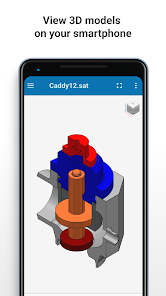
CAD Exchanger allows to view, explore, and convert 3D CAD models across 30+ key CAD formats, incl. native (SOLIDWORKS, CATIA, Siemens NX, DWG...), neutral (JT, STEP, IGES, IFC...) and kernel (Parasolid, Rhino, ACIS...) formats.
Whether you are on a shop floor, at a business meeting, or just outside your office you can still work with your 3D models and share files with your partners.
Free mobile version of CAD Exchanger complements more feature-rich commercial desktop and Cloud versions. All of them run on CAD Exchanger SDK, our own CAD formats conversion technologies which you can use to build your own 3D mobile, web and desktop apps: https://cadexchanger.com/developers.
3D CAD formats import (under 25Mb):
▸ SOLIDWORKS (sldprt; sldasm)
▸ CATIA (CATPart; CATProduct)
▸ Siemens NX (prt)
▸ STEP (stp; step)
▸ JT (jt)
▸ Parasolid (x_t; x_b)
▸ STL (stl)
▸ PTC Creo (prt, asm)
▸ ACIS (sat; sab)
▸ IGES (igs; iges)
▸ Inventor (ipt, iam)
▸ Solid Edge (asm, par, psm)
▸ 3D XML (3dxml)
▸ IFC (ifc)
▸ OBJ (obj)
▸ VRML (wrl)
▸ Rhino (3dm)
▸ AutoCAD Drawing (dwg)
▸ DXF (dxf)
▸ glTF (gltf, glb)
▸ PLY (ply)
▸ Collada (dae)
▸ 3D PDF (pdf)
▸ X3D (x3d)
▸ 3MF (3MF)
▸ U3D (u3d)
▸ PRC (prc)
▸ Open CASCADE (brep)
3D CAD formats export:
▸ STEP (stp; step)
▸ STL (stl)
▸ IGES (igs; iges)
▸ OBJ (obj)
▸ VRML (wrl)
▸ CAD Exchanger native
Available operations with 3D CAD models:
● Product structure navigation to access parts and assemblies
● Basic properties editing such as color and name assignments
● Switching between B-Rep and polygonal representations
● Sectioning and exploded views creation
● Access to basic dimensions data
Product structure navigation
Product structure navigation allows you to show or hide model’s individual parts and sub-assemblies and get instant access to the measurement information in a few taps.
Flexible view capabilities
Depending on your goals you can choose B-Rep geometry or polygonal mesh representations for your CAD drawings. You can visualize 3D models in wireframe, shading modes or combinations of the above.
Sectioning and exploded views
You can explore internal details and component layout of the models with the help of sectioning views, which allow to cut the model in several dimensions and choose the sectioning plane position. Or just visually explore your 3D model and understand the underneath of the design with a help of an exploded view.
Colors and names editing
You can assign or modify colors and names of the parts and assemblies to make your 3D model more visually appealing, easy to navigate through and for efficient BOM (Bill of Material) generation in the downstream apps.
Access to basic dimensions data
Build a bounding box of a part, an assembly or a whole model in a couple of taps. With the visual evaluation of the occupied space you will also receive accurate information including dimensions, minimum and maximum corner coordinates.
Excellent performance
CAD Exchanger is empowered with patented parallel computational algorithms. Although you can hardly work efficiently with very large 3D models on mobile devices you can still get shorter loading times and great application responsiveness.
Limitations
Due to limited performance and memory of mobile devices, imported CAD files are limited in size. The list of exported formats as well as some functionality is also limited (e.g. no distance and and angular measurements are available). Desktop and cloud versions (which you can find at https://cadexchanger.com/products) are free of these limitations.
We hope you will enjoy working with CAD Exchanger. If you face any issues with CAD Exchanger please contact us via support@cadexchanger.com. We will be happy to respond and make the product better with the help of your feedback.
CAD Exchanger: View&Convert 3D 使用排名
基於 Similarweb 的算法,根據過去 28 天的安裝數和活躍用戶數進行計算。
所有類別 在
美國--
生產力 在
美國--


 CAD Exchanger: View&Convert 3D VS.
 1月 12, 2026