

1月12日 的 AnyScanner-PDF scanner, OCR, 應用程式分析

AnyScanner-PDF scanner, OCR,
- InnovaLife
- Google Play 商店
- 免費版
- 工具
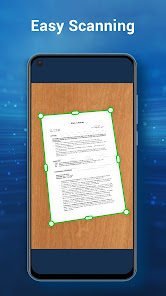
Any Scanner is an easy-to-use app.It will turn your phone’s cam into a PDF scanner.
It can use your phone’s cam to scan anything including documents, paper notes, receipts, and books into clear PDFs and images. It also can convert images into text with OCR technology. Any Scanner can help you to deal with your work easily when you have files and need to scan to share them. Download it for free!
Features of AnyScanner:
---Quickly & Easily Scan Document
Any Scanner use your phone cam to scan every documents you meet in daily life: paper notes, receipts, books, whiteboard discussions, business cards, certificates, power point etc.
---High Scan Quality:
Any Scanner can crop smart and auto enhancing to make sure the texts and documents in scanned are clear and sharp.
---Identify & Extract Texts from Image
Any Scanner can use OCR (optical character recognition) technology to convert images into text for editing or sharing.
--- VIEW AND PRINT PDFs
• Open and view PDFs
• Choose Single Page or Continuous scroll mode.
• Print PDF directly from your device.
---PDF compressor
Any Scanner can simply reduce pdf file size with a single tap.
---Documents backup
Backup your documents to cloud, and get them anywhere
---Powerful & Clear PDF Files Manager
Any Scanner has a legible file list to show all PDF or JPG files. Also can help you to find them in your mobile devices. In Any Scanner you can read them next time!
--- Share PDF Files
Any Scanner can send documents in PDF or JPEG format to friends via various ways.
--- Advanced Document Editing
AnyScanner offers a full set of editing tools such as cropping size, controlling brightness, and adding filters to edit documents.
Contact Us
If you have any questions or suggestions to us,please email to :innovalifemob@gmail.com. We’d like to hear your feedback!
AnyScanner-PDF scanner, OCR, 使用排名
基於 Similarweb 的算法,根據過去 28 天的安裝數和活躍用戶數進行計算。
所有類別 在
美國--
工具 在
美國--



 AnyScanner-PDF scanner, OCR, VS.
 1月 12, 2026