

12月5日 的 Pie Controls Gestures 應用程式分析

Pie Controls Gestures
- Manuel Wrage
- Google Play 商店
- 付費
- 工具
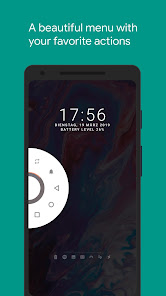
"Pie Control" is the perfect companion for your day to day phone usage.
It gives you the ability to use your phone with just one hand via gestures.
Simply swipe from one of the edges of your screen to reveal a functional and visually pleasing menu which shows your favorite actions, notifications and status information.
Features
• Color settings to make the "Pie Control" yours
• You can view all of your notifications inside the "Pie Control"
• Multiple pies
• Two Rows
• Pie Points
• Stateful icons
• Trigger area settings
• Tons of customization options to fine grain your "Pie Control" experience
• Material Design
• Custom icons
• Broadcast support to toggle pie from "Tasker" and other automation apps
• "Xposed Framework" support to enhance functionality and compatibility
• It's possible to hide the navigation bar without root by using the integration with "Hide Navigation Bar"
Actions
• Back
• Home
• Recents
• Torch
• Lock Screen
• Screenshot
• Open notification shade
• Open quick settings
• Open power dialog
• Launch apps
• App Shortcuts
• Nougat App Shortcuts
• Open camera
• Open dialer
• Open call log
• Open contacts
• Screenshot
• Switch to last app
• Toggle Bluetooth
• Toggle WiFi
Colors
• Custom colors
• Light and Dark
• Per App which tints the "Pie Control" in the colors of the foreground app
• Shuffled Material which tints the "Pie Control" in random colors
• Twilight which automatically switches between light and dark
• Sky which matches the color of the sky
Special thanks
A special thanks goes out to the "Paranoid Android" team. Their beautiful pie redesign inspired me to built this application.
Accessibility services
This app uses accessibility services to programmatically execute actions such as back, home or quick settings.
This app does not collect any data via accessibility services
Hide the navigation bar
"Vivid Navigation Gestures" allows you to hide your stock nav bar as long as the gestures are enabled.
You need ADB or Root in order to use that feature.
Android ADB PC instructions
1 - Enable Developer Mode in the Android settings.
2 - Enable USB Debugging
3 - Setup ADB on your PC
4 - Run the following adb command to grant the permission:
adb shell pm grant com.ivianuu.pie android.permission.WRITE_SECURE_SETTINGS
To restore the navigation keys disable the app or run this command:
adb shell wm overscan 0,0,0,0
How to install ADB
Gadget Hacks - https://youtu.be/CDuxcrrWLnY
Lifehacker - https://lifehacker.com/the-easiest-way-to-install-androids-adb-and-fastboot-to-1586992378
Xda developers - https://www.xda-developers.com/install-adb-windows-macos-linux/
Links
Reddit:
https://www.reddit.com/r/manuelwrageapps/
Pie Controls Gestures 使用排名
基於 Similarweb 的算法,根據過去 28 天的安裝數和活躍用戶數進行計算。
所有類別 在
美國--
工具 在
美國--




 Pie Controls Gestures VS.
 12月 5, 2025