

12月27日 的 Amazing Note 應用程式分析

Amazing Note
- FingerTory
- Google Play 商店
- 免費版
- 生產力
Amazing Note is an integrated organizer of your life.
The smarter, faster, powerful, easier way to Note!
Amazing Notes is the most convenient note app for android.
Experience Amazing Note. Your life will be smart.
[Main features]
- Group(Folder)
- Tags for each note / Group
- Passcode protection in start-up screen and for each Group
- Clickable links (web / email address / phone number) in read-only mode
- Insert data/time/phone number
- Lunar date
- Theme (customize text size, color, style, line spacing)
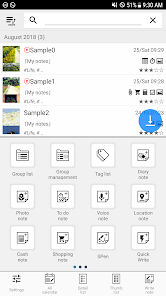
- Multiple various notes (photo, audio, table, map, attachment, shopping, cash, ..)
- Paint notes - Draw notes using your finger
- Attach multiple note files
- Todo / To-do
- Table style note
- Auto-save note
- Send notes via text(image) message
- Powerful Reminder : Time Alarm, All day, Repetition.(lunar calendar)
- Anniversary, D-day
- Reminder on status bar
- Template
- Shortcuts to home screen
- Switch between list view and thumbnail view
- Various list view
- Sort by creation time/modify time, alphabetical, priority
- Sort notes for easier filtering
- Display To-dos, Notes, Events, Photos, Voices, Etc in Calendar
- Visibility filter for calendar and note list
- Image Export (Calendar)
- Support Anniversary Note(lunar) & Diary Note
- Expenses for congratulations and condolence
- Mission statement
- Backup/Restore
- Search all notes contents
- Advanced Search (full text, date, priority, tag, group)
[Guidance on Permissions]
1. Use the MANAGE_EXTERNAL_STORAGE permission to access files such as photos/voices attached to backup/restore and notes on devices with Android 12 or higher. (all file access rights)
2. Use READ_CONTACTS permission to get and add user's contact information to notes.
3. Use the CAMERA permission to take a picture and attach it to a memo.
4. Use the RECORD_AUDIO permission to record voices and attach them to notes.
5. Use READ_CALENDAR, WRITE_CALENDAR privileges to display, add or change the user's calendar (calendar).
6. Use the GET_ACCOUNTS permission to access the user's Google account and get schedules, etc.
7. Access the external memory to attach files such as photos and documents to the memo. Use READ_EXTERNAL_STORAGE, WRITE_EXTERNAL_STORAGE permissions.
8. Access external memory to back up and restore data. Use READ_EXTERNAL_STORAGE, WRITE_EXTERNAL_STORAGE permissions.
9. Use the ACCESS_COARSE_LOCATION and ACCESS_FINE_LOCATION permissions to attach the user's location information (latitude/longitude, address, map) to the memo.
※ We do not collect, process, or transmit any data after obtaining permission (1-9).
Amazing Note 使用排名
基於 Similarweb 的算法,根據過去 28 天的安裝數和活躍用戶數進行計算。
所有類別 在
美國--
生產力 在
美國--


 Amazing Note VS.
 12月 27, 2025