

12月20日 的 Darker Pro 應用程式分析

Darker Pro
- mlhgdevelopment
- Google Play 商店
- 付費
- 健康與健身
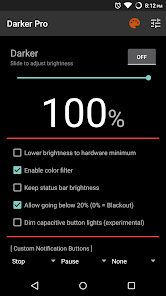
Darker can lower your screen brightness to extremely low levels, to help prevent eyestrain during the night. Use the built-in color filter* to adjust the color of your display, perfect for filtering out harsh white backgrounds during the night.
Users can either upgrade the free version to Pro through in-app purchase, or directly purchase this version (for countries that don't support In-app purchases) - both are the same in terms of functionality.
Features only in the Pro version:
» Auto-On & Auto-Off
» Start at boot
» Lower brightness below 20%
» Darken navigation bar
» Custom filter colors
» Root mode
» Customizable notification buttons
• Up to three buttons can be added for quick access.
• Buttons to increase and decrease the brightness (+5%, -5%, +10%, -10%)
• Buttons to set a specific brightness (@0%, @10%, @20%, ... , @90%, @100%)
• Quick toggles (stop, pause, reset, color filter)
Note: When manually installing APK files, Android blocks the "Install" button from being pressed when Darker is running. This is NOT a bug. It's a protective measure to prevent malicious apps from camouflaging the install button. Pausing Darker will solve this.
Darker requires the use of accessibility services to darken the screen, no data will be accessed or shared via the AccessibilityService API.
*The color filter is similar to how the desktop version of f.lux works. Selecting a redder color will reduce more bluelight emitted from the display.
Tasker Support
Darker has Tasker support, use these intents to send commands to Darker:
darkerpro.STOP
darkerpro.PAUSE
darkerpro.INCREASE_5
darkerpro.INCREASE_10
darkerpro.DECREASE_5
darkerpro.DECREASE_10
darkerpro.SET_10
darkerpro.SET_20
darkerpro.SET_30
darkerpro.SET_40
darkerpro.SET_50
darkerpro.SET_60
darkerpro.SET_70
darkerpro.SET_80
darkerpro.SET_90
darkerpro.SET_100
darkerpro.TOGGLE_COLOR
darkerpro.ENABLE_COLOR
darkerpro.DISABLE_COLOR
Add the above intents to Tasker by going to Action Category→System→Send Intent→Action, leave the other fields default, and note that the intents are case sensitive.
These two intents below need an additional parameter in the "Extra" field
darkerpro.SETCOLOR "Extra" field: COLOR:1~16 (Colors are numbered left to right, top to bottom)
darkerpro.COLORSTRENGTH "Extra" field: STRENGTH:1~10
The intent below needs the "Target" field set to "Service"
darkerpro.START
Darker Pro 使用排名
基於 Similarweb 的算法,根據過去 28 天的安裝數和活躍用戶數進行計算。
所有類別 在
巴西#165
健康與健身 在
巴西#5


 Darker Pro VS.
 12月 20, 2025