

1月16日 的 Smart Cursor: One-handed mode 應用程式分析

Smart Cursor: One-handed mode
- Phone Phreak
- Google Play 商店
- 免費版
- 工具
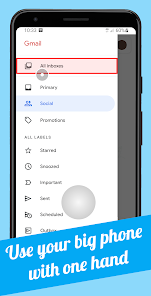
Use a computer-like cursor/pointer to conveniently control your big smartphone with one hand.
Easy to use:
1. Swipe from the left or right margin from the bottom half of the screen.
2. Reach the top half of the screen with the cursor by dragging the tracker, using one hand in the bottom half.
3. Tap the tracker to click with the cursor. The tracker will disappear on any click outside it or after a period of time.
Smart Cursor is free and without ads. Customization options and behavior settings for cursor, tracker and button highlights are freely accessible.
Snap-to-Click: When you move the cursor, any clickable button will be highlighted. Smart Cursor also recognizes which button you are aiming at. Once the button is highlighted, you can already perform a click on it by tapping the tracker. This greatly helps with clicking small buttons.
Quick Settings tile: As the most convenient way to enable/disable the cursor, you can add the Smart Cursor tile to your Quick Settings tray.
Context actions (Pro version): With Context actions, long pressing a button will trigger an action specific to its function. For a button in a horizontal row it's scrolling, for the status bar it's pulling down the notifications.
Features in the Pro version: (SPECIAL OFFER UNTIL THE END OF THE MONTH: PRO FEATURES FREE)
- Trigger more gestures with the cursor: Long click, drag & drop
- Context actions: long pressing a button will trigger an action specific to its function (scroll / expand notifications)
- Swipe action: trigger Back, Home, Recents button, expand Notifications or Quick Settings by swiping in and out from the margin
- The option to blacklist/whitelist apps
NOTE: Highlighting clickable buttons, Snap-to-Click and Context actions work only in regular apps, not in games and not in web pages.
Privacy
The app does not collect or store any data from your phone.
The app does not use any internet connection, no data will be sent over network.
Accessibility Service
Smart Cursor requires you to enable its Accessibility Service before you can use it. This app uses this service only to enable its functionality. It needs the following permissions:
◯ View and control screen:
- to highlight clickable buttons
- to detect which app window is currently showing (for blacklist feature)
◯ View and perform actions:
- to perform click/swipe gestures for the cursor
Smart Cursor will not process any data about your interactions with other apps.
Gmail™ email service is a trademark of Google LLC.
Smart Cursor: One-handed mode 使用排名
基於 Similarweb 的算法,根據過去 28 天的安裝數和活躍用戶數進行計算。
所有類別 在
巴西--
工具 在
巴西--
用戶興趣和熱門類別
Smart Cursor: One-handed mode用戶使用的熱門類別和應用程式












 Smart Cursor: One-handed mode VS.
 1月 16, 2026