

2月11日 的 KODAK Photo Printer 應用程式分析

KODAK Photo Printer
- PRINICS Co., Ltd
- Google Play 商店
- 免費版
- 攝影
The new features including the AR and beauty functions will blow you away! Thanks.
Supported Models :
Kodak 2 inch Printer (P210, M200)
Kodak 2 in 1, 2 inch Camera (C210, MS200)
Kodak 3 inch Square Printer (P300, M300)
Kodak 3 inch Square 2 in 1 Camera (C300, MS300)
Kodak 4inch Square Camera (MS400)
Kodak 6 inch Dock Printer (PD460, D600)
[How to Use]
1. Connect the printer to a power source.
(For battery models, make sure the battery is sufficiently charged.
For adapter models, use the provided adapter.)
2. Turn on the printer.
3. Make sure there is enough cartridge and paper in the printer.
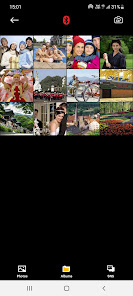
4. Open the app and tap the Bluetooth icon at the top.
In the list of paired or discovered devices, find your printer’s name and tap to connect.
5. If you cannot find the printer name in the app,
go to your phone’s Bluetooth settings and search for the MAC address.
The MAC address is located inside the printer’s door.
For Dock Printers, dock your smartphone at the pin on top,
or find the MAC address on the underside of the printer to connect via Bluetooth.
6. Select an image from your Gallery or take a photo with your smartphone.
7. After selecting an image, edit it as you like.
8. When editing is complete, press the print button located on top of the printer.
9. For the first print, a firmware update may be required.
Please follow any on-screen instructions on your smartphone.
10. Printing takes about one minute.
Please do not pull out the photo until it is completely ejected.
KODAK Photo Printer 使用排名
基於 Similarweb 的算法,根據過去 28 天的安裝數和活躍用戶數進行計算。
所有類別 在
美國--
攝影 在
美國#198
用戶興趣和熱門類別
KODAK Photo Printer用戶使用的熱門類別和應用程式












 KODAK Photo Printer VS.
 2月 11, 2026