

1月21日 的 Simple Sticky Notes 應用程式分析

Simple Sticky Notes
- Sourav Rana - Notes
- Google Play 商店
- 免費版
- 生產力
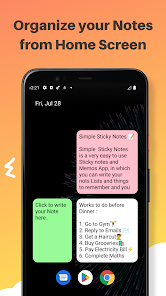
Simple Sticky Notes - Color Notes and Memos is a very simple to use Sticky Notes and memos App in which you can write your Notes, Lists, Tasks, To Do Lists, Things To Remember, Memos etc. and you can manage them from the home screen of your Android Device. You can quickly write down your Tasks and Notes by Clicking on the Widget on your Home Screen.
You can change the background color of your simple sticky notes widget from the given 4 colors in the App. you can also change the size of text in the editor to small, Large or default Medium. It is a very lightweight, and easy to use sticky notes widget. Both colors and text size can be changed while creation as well as while Editing. The Simple Sticky Notes Widget is Resizable and can be placed anywhere. you can create as much as Widgets as you want with different Colors, Text Sizes, and widget sizes.
**Features**
- Resizable widgets
- Rich Text Editor : make your Text Bold, Itealic, Underlined, change the font color and many more
- Scrollable text in widget Editor
- Light weight
- Customize with 4 different background colors
- Change text size in Widget Editor
- Easy to use
- Use multiple widgets on Screen
*Note*
If you are not able to put simple sticky notes widget on your home screen you can add it manually why doing following:-
- if you click on the "User Guide Button" on the Main Screen of your App. You will be redirected to a YouTube tutorial explaining How to add Simple Sticky Notes Widget to Home Screen Manually and use them. for your convenience steps are also given below -:
1) On a Home screen, touch and hold an
empty space and Tap Widgets or Shortcuts Tab.
2) Touch and hold Simple Sticky notes widget from widget list. Slide it to home Screen where you want it. Lift your finger.
3) Write your Text on Widget Editor and change widget background color or text size from "Color and Text" button, then press "save" button to save it.
4) Resize your widget according to your
need and press back
button.
5) Click on Your widget if you want to edit it again.
That's it If you still have any questions, find any bugs or want me to add any other feature in the next update of the Simple Sticky Notes App, Please let me know in the Reviews section or write me on ranasourav3817@gmail.com.
Thank you.
Sourav
Simple Sticky Notes 使用排名
基於 Similarweb 的算法,根據過去 28 天的安裝數和活躍用戶數進行計算。
所有類別 在
德國--
生產力 在
德國--
用戶興趣和熱門類別
Simple Sticky Notes用戶使用的熱門類別和應用程式











 Simple Sticky Notes VS.
 1月 21, 2026