

1月7日 的 Samsung Camera Manager App 應用程式分析

Samsung Camera Manager App
- Samsung Electronics Co., Ltd.
- Google Play 商店
- 免費版
- 工具
[Compatible models]
- NX1, NX500 (and latest Samsung Cameras featuring both bluetooth and Wi-Fi.
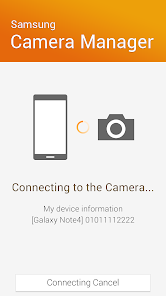
'Samsung Camera Manager' works in conjunction with the latest wireless sharing features found in the newest Samsung Smart Cameras including the NX1.
With this app installed, your smart camera and mobile device are easily paired for fast and easy image sharing.
[Main features]
1. Quick connection between Samsung Smart Camera and mobile devices
- Using Bluetooth and Wi-Fi devices can always be connected
2. MobileLink
- Copy selected photos from the Samsung Smart Camera to the mobile device
- Upload & share photos taken by the Samsung Smart Camera via the mobile device
3. Remote Viewfinder (Pro)
- See the live view of the Samsung Smart Camera on your mobile device
- Remotely control & operate the Samsung Smart Camera from your mobile device
4. Quick Transfer
- Transfer thumbnail images to mobile device instantly after taking picture
5. Auto GPS Tagging
- Automatically add GPS data to images taken by the Samsung Smart Camera when the smart camera and mobile device are connected
6. Auto Time Setting
- Automatic date and time setting on the Samsung Smart Camera via GPS data received from the connected mobile device
- no need to set the date and time even when traveling abroad
[System requirements]
- You can use this application on Android phones with Android OS 4.2.2 or later JELLY BEAN, KitKat 4.3, LOLLIPOP 5.0/5.1 , MARSHMALLOW 6.0, NOUGAT 7.0
- This application is not available for some Android devices
- Bluetooth and Wi-Fi
- The latest Samsung Galaxy phone is recommended for best connection speeds
[Remarks]
- If you experience issues connecting the camera with your smartphone, the following should correct the issue.
(Note, the menus and options may vary depending on the smartphone manufacturer and telecom operator)
Go to: Settings → Wi-Fi → Advanced.
From there make sure "Auto switch between Wi-Fi networks and mobile networks" is not checked.
This option may be titled "Auto network switch" or "Check for Internet service" depending on OS version and telecom operator. With this option not selected the issue should be corrected.
The following access rights are required for service. For optional access permissions, the default functionality of the service is enabled, although not allowed.
[Essential Access Rights]
- Storage space: Purpose of providing the function to save the contents stored in the camera
- Phone: Purpose of confirming reception of the phone during remote shooting of the camera
- Location: Purpose of transmitting location information to camera
- Contacts: Use to provide services that need to be linked with accounts using registered Samsung account information
Samsung Camera Manager App 使用排名
基於 Similarweb 的算法,根據過去 28 天的安裝數和活躍用戶數進行計算。
所有類別 在
美國--
工具 在
美國--
用戶興趣和熱門類別
Samsung Camera Manager App用戶使用的熱門類別和應用程式











 Samsung Camera Manager App VS.
 1月 7, 2026