

1月13日 的 File Transfer (Wear OS) 應用程式分析

File Transfer (Wear OS)
- Somyac
- Google Play 商店
- 免費版
- 生產力
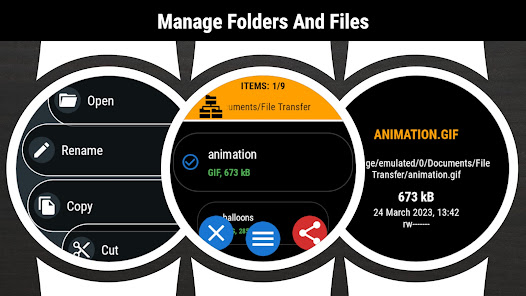
The core functionality of the application is to manage files and folders in the shared memory of the smartwatch.
File Transfer is unique app working in the standalone mode.
It does not require any additional software in the smartphone to send and receive data from your smartwatch.
Key features:
✓ sending files to any Bluetooth device - smartwatch/smartphone/tablet/PC
✓ receiveing files from any Bluetooth device
✓ browsing folders and files
✓ viewing files content
✓ copy/paste/rename/sort/delete options
✓ displaying memory information
✓ searching files
✓ zip/unzip option
✓ intuitive menu
Sending file from smartwatch:
1. (in smartwatch) Go to the App Menu → Start edit
2. (in smartwatch) Click on the checkbox next to the file name
3. (in smartwatch) Go to the App menu → Share
4. (in smartwatch) Select receiver from the list
5. (in smartphone) Accept incoming file
6. (in smartphone) Go to Download folder to view the file
Receiving file in smartwatch:
1. (in smartwatch) Go to the App Menu → Set visible
2. (in smartphone) Use any file browser app → Share → Bluetooth
3. (in smartphone) Click on the watch name. If watch name is not visible on the list - click the Scan/Stop button (wait and/or retry 2-3 times)
4. (in smartwatch) Accept incoming file
5. (in smartwatch) Go to Downloads folder to view the file
☆ File Transfer is designed for Wear OS devices
File Transfer (Wear OS) 使用排名
基於 Similarweb 的算法,根據過去 28 天的安裝數和活躍用戶數進行計算。
所有類別 在
巴西--
生產力 在
巴西#1,173










 File Transfer (Wear OS) VS.
 1月 13, 2026