

1月27日 的 iCut: Video Editor & Maker 應用程式分析

iCut: Video Editor & Maker
- iCut -Video Editor & Video Maker App
- Google Play 商店
- 免費版
- 影片播放器與編輯器
iCut--A Video Editor & maker provides powerful video editing features, allowing you to create stunning videos effortlessly.
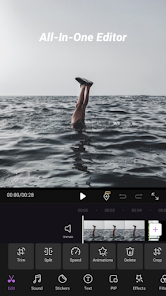
iCut is an all-in-one editing tool for both video and photo. iCut allows you to cut, crop, rotate, merge, split, and add transitions, filters, stickers, texts, music, voice extraction, and more. With iCut, you can easily merge multiple clips, add video effects, and adjust video speed. Additionally, you can fine-tune the brightness, contrast, saturation, speed, volume, and other parameters of your videos and photos. iCut enables you to export your videos in various formats and resolutions, and share them on social media platforms like YouTube, Instagram, and TikTok.
Features:
--Video Editing
•Split/Trim video.
•Cut Video: Precisely cut video clips as desired. Simply drag the timeline to remove the unwanted segments.
•Merge Videos: Combine multiple clips into a seamless, high-quality video.
•Adjust Video Ratio: Fit your video and photo in any aspect ratio for Youtube, TikTok, Instagram, and whatsapp.
•Speed: Video Speed up/ slow. Make slow motion and make the video speed more smooth.
•Add Custom Watermark: Protect your work with personalized watermarks. Essential for any video maker and movie maker.
•Custom Backgrounds: Easily remove background
--Advanced Movie Maker
•Picture-in-Picture(PIP): Overlay a smaller video or image on top of a larger one. Adjust size, position, and opacity for dynamic effects.
•Keyframe: Make video pro: video camera movement, sticker movement, subtitle scrolling, closing effects, etc.
•Reverse: Play the video backwards. Can choose to reverse one clip or the whole video.
•Mask: Hide or reveal parts of the video. You can choose from different shapes, such as circle, square, star, etc, and adjust the size, position, and feather of the mask. You can also animate the mask with keyframes.
•Video Template: Import your local videos into iCut, and then quickly generate to hot style videos.
--Music&Voice-over
•Add sound effect to your video.
•Extract audio from video.
•Music-synced video
•Video Dubbing and voice-over in iCut.
•Adjust volume and make the music fade in /out.
--Sticker&Text
•Multiple and all kinds of stickers and text fonts are available.Add fun and cute elements to your video, such as emojis, animals, flowers, or birthdays stickers.
•Add styles and animations to the subtitle text of your vlog.
•adjust the text animation with key frame.
Filters&Effects
•Change the color, tone, mood, or style of your video, use the preset filters such as black and white, sepia, vintage, or cartoon.or customize your own filter settings.
•Add some magic or drama to your video, such as fire,, snow, or glitch. You can choose from different types of effects and adjust their duration.
iCut is a useful and easy-to-use video editor which has various of video template to use and makes the video editing become fast, and reliable.A powerful video editing tool for video creator and collage maker.
Contact us:
If you have any questions and advise about iCut(quick free video editor, film maker, collage maker),please feel free to contact us through the email address:team@icutservice.com.
More video information and tutorial videos can follow our instagram account:
https://www.instagram.com/icut_editor/
iCut: Video Editor & Maker 使用排名
基於 Similarweb 的算法,根據過去 28 天的安裝數和活躍用戶數進行計算。
所有類別 在
美國--
影片播放器與編輯器 在
美國#424
用戶興趣和熱門類別
iCut: Video Editor & Maker用戶使用的熱門類別和應用程式














 iCut: Video Editor & Maker VS.
 1月 27, 2026