Don’t miss outtag icon
Get early access to Digital 100 2026, Similarweb’s official ranking of the fastest-growing brandsPre-register now!banner icon

12月27日 的 Kyvol 應用程式分析

Kyvol

Kyvol

  • Vantop Developer
  • Google Play 商店
  • 免費版
  • 生活方式
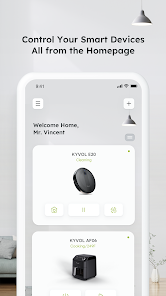
How to use Kyvol app Step 1. Download the app Download the app from Appstore. Step 2. Register your account: After downloading the app, create an account with your Email address. If you already have a Kyvol account, you can log in directly. Step 3. Add your devices to Kyvol app: Open the Kyvol app and follow the setup procedure to pair new devices with your smartphone. Step 4. Use your devices: After the pairing the succeed, the new device will show up in the device list. You can simply tap the icon and start enjoying the Kyvol smart home experience.
Kyvol

Kyvol 使用排名

基於 Similarweb 的算法,根據過去 28 天的安裝數和活躍用戶數進行計算。

所有類別 在
美國--
生活方式 在
美國#2,263

每日活躍使用者

通過查看Kyvol 的下載量和每日活躍用戶數,分析 Kyvol 用戶的使用模式。

位使用者

通過查看Kyvol 的下載量和每日活躍用戶數,分析 Kyvol 用戶的使用模式。

解鎖每日活躍使用者
10月11月12月

隨時間變化的 Kyvol 排名統計

Similarweb 的使用排名和Google Play 商店Kyvol排名

使用排名

排名

Kyvol按國家/地區排名

Kyvol 在其主要類別中排名最高的國家


用戶興趣和熱門類別

Kyvol用戶使用的熱門類別和應用程式

熱門分類
關聯性
該類別中的熱門應用
More apps
23%
Target: Shop Deals & Trends
Amazon Shopping
Klarna | Pay your way
Kroger
PetSmart
13%
Google Home
Nest
Samsung Wallet (Samsung Pay)
12%
Phone by Google
Clock
Speedtest by Ookla
Google
Google’s Find Hub
9%
Experian
Huntington Mobile Banking
Intuit Credit Karma
Capital One Mobile
Venmo

的頂級競爭對手和替代方案

來自同一應用商店,有很高可能被相同使用者使用的應用程式。

Daccord - Easy Group Decisions

Daccord - Easy Group Decisions

SquirrelShark

INKBIRD

INKBIRD

INKBIRD

Fayez

Fayez

Warba Bank

Kyvol VS.

12月 27, 2025