

2月10日 的 WeNote: Notes Notepad Notebook 應用程式分析

WeNote: Notes Notepad Notebook
- Notes Notepad Notebook
- Google Play 商店
- 免費版
- 生產力
Notes Made Easy
Looking for an easy-to-use notepad for quick note-taking? Need a convenient memo pad for to-do lists and shopping lists? Our free note-taking app and notebook provides all that with no full-screen ads!
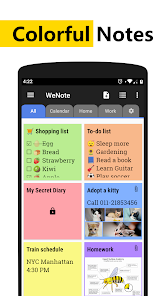
⭐WeNote: Notes, Notebook, To do⭐ is a versatile note-taking app. Quickly create color notes, to-do lists, shopping lists, reminders, and calendars.
Users adore WeNote® for organizing their lives, planning work, or keeping study notes. It simplifies note-taking, making it more effortless than other notepad or memo apps.
From jotting down memos, emails, phone numbers, and recipes to maintaining a diary, shopping lists, and to-do lists, you'll find WeNote® exceptionally user-friendly. 😁
Prioritize your privacy with WeNote®. It functions seamlessly offline without any need for internet connectivity or login.
Ensure your notes' security by locking them using a PIN, pattern, password, or fingerprint, safeguarding your confidential information.
📝 How to Take a Note?
WeNote® functions as a straightforward word processor, allowing unlimited character input. Once a note is saved, you can pin it to the top, check it off, lock it with a password, stick it to the notification bar, or share and delete it via the menu.
✔️🛒 How to Make Todo List or Shopping List?
In to-do list mode, you can add unlimited checklist items. Simply tap and drag to rearrange them. Tap an item once you've finished it to strikethrough.
Features
🎨 Choose from unlimited note colors.
📝 Craft colorful notes and to-do lists.
📁 Organize memos with both labels and colors.
🚀 Swipe between notes effortlessly with labels designed as tabs.
🖼️ Easily attach photos and images to your notebook.
🖌️ Sketch and paint directly within the notepad.
🎤 Record voice memos hands-free with unlimited recording capacity.
📌 Pin crucial notes to the top and stick them to the notification bar for easy access.
🗒️ Display 5 distinct sticky note widgets on your home screen.
🔒 Keep your notes confidential with a secure lock.
✔️ Completed tasks move automatically to the bottom of your checklist.
👀 Personalize your notes with various fonts, viewing modes, and sorting options.
🎀 Choose from 11 vibrant app color themes for aesthetic appeal.
📅 Set reminders and view a calendar, complete with a lunar phase.
🛎 Never miss a memo with customizable, repeatable reminders.
🎉 Access a global holiday calendar supporting 250 countries and 3,680 regions.
☁️ Sync safely to WeNote® Cloud or Google Drive, ensuring no lost notes.
⬆️ Backup and restore locally for added note security.
👨👧👧 Share notes via email, SMS, and various messaging apps.
⏪ Undo/redo functionality ensures error-free note-taking.
🔗 Automatically convert URLs and phone numbers into clickable links.
🖨️ Send notes directly to a printer or export as PDF.
🔎 Instantly search through notes and to-do lists.
Various Home Widgets for Quick Access
There are 5 widgets: sticky notes, mini sticky notes, quick-add, calendar, and note list.
Color-Coded Personalization
This notebook lets you categorize notes with 12 pre-defined vibrant colors. Plus, WeNote® offers an option to choose your favorite color, giving you unlimited personalization.
Well Organized Notes
WeNote® allows you to categorize notes by creating labels. These labels can be displayed as Tabs or based on menus.
Calendar Memo to Keep Things Organized
This notepad features a built-in calendar, allowing you to jot down memos and set reminders easily. It even displays public holidays. Thanks to its intuitive design, you can use WeNote® as both an agenda planner and family organizer—perfect for planning trips or scheduling business meetings.
Secure Lock to Keep Notebook Private
Secure your notes with this notepad. Lock individual entries or the entire app to ensure your notebook's privacy.
Discover the joy of organized thoughts with WeNote® – your ultimate note-taking companion.
WeNote: Notes Notepad Notebook 使用排名
基於 Similarweb 的算法,根據過去 28 天的安裝數和活躍用戶數進行計算。
所有類別 在
巴西#2,537
生產力 在
巴西#259
用戶興趣和熱門類別
WeNote: Notes Notepad Notebook用戶使用的熱門類別和應用程式



















 WeNote: Notes Notepad Notebook VS.
 2月 10, 2026