

1月7日 的 SqueezePlayer 應用程式分析

SqueezePlayer
- Stefan Hansel Solutions UG (haftungsbeschränkt)
- Google Play 商店
- 付費
- 音樂與音訊
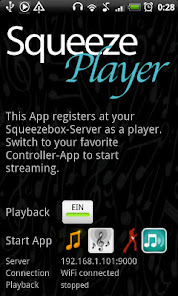
Do you want to stream all your Logitech Squeezebox content directly to your Android Device? Then SqueezePlayer is your perfect match - it turns your Android phone or tablet into a SqueezeBox on its own!
You won't even need a Logitech Squeezebox to make SqueezePlayer work - just download the (free) Squeezebox-Server (see below)
★★★ Stream your Music via WiFi or Mobile Connection ★★★
Make your music free! Now you can take all your music with you - car, school, work, garden, anywhere in your house.
SqueezePlayer is able to stream your local music (see below for supported formats), internet radio stations or songs from Apps like Last.FM, Deezer or WiMP from your Squeezebox-Server directly to your mobile or tablet. (Rhapsody, Napster and Pandora NOT working right now, due to licensing issues, Spotify only works with the help of triodes plugin installed in a Squeezebox-Server).
For playback to be working via 3G you will need to open/forward port 9000 and 3483 on your router (as well as setting up a DynDNS service). As networking/streaming from your home network via internet is not straightforward, please also visit my growing tutorial: http://www.squeezeplayer.com/2011/05/how-to-connect-via-3g/
SqueezePlayer is a playback App - you won't be able to control your Squeezebox (nor itself) with it. But there are enough Apps out there being a perfect fit: OrangeSqueeze, SqueezeCommander, Squeeze Control or free alternatives like the official Logitech App, Squeezer or SqueezeDroid.
From the main screen of SqueezePlayer you can jump directly to any of these App, where you mobile will be among all other players as long as SqueezePlayer is activated.
In OrangeSqueeze this also works the other way round: it will start SqueezePlayer automatically from the players list, so here it is highly integrated.
By the way: if you have any problem with SqueezePlayer, please contact me! I'm very happy to help you sort all problems out: support(at)squeezeplayer.com
★★★ Supported Music Formats ★★★
SqueezePlayer can stream FLAC, MP3, WAV and PCM natively (i.e. these are decoded directly on your Android Device)
Your SqueezeboxServer will be able to convert other file types (Ogg, mp4) to FLAC or mp3 on the fly, so these will play as well. (You can check the settings screen of your Squeezebox Server under Advanced->File Types what other file types will be transcoded to FLAC or mp3).
Please note that the inbuilt server of the Touch will not be able to transcode as much as a real server, you will be bound to the natively support formats!
★★★ Requirements ★★★
For SqueezePlayer to work you need to set up the Logitech Squeezebox Server (recently renamed to "Logitech Media Server").
You can download it here: http://downloads.slimdevices.com/LogitechMediaServer_v7.7.1/
SqueezePlayer will also work with the integrated server of the Squeezebox Touch (but be aware, that this one cannot convert as many formats as a real server).
I test against version 7.5 - 7.7 of the server.
SqueezePlayer 使用排名
基於 Similarweb 的算法,根據過去 28 天的安裝數和活躍用戶數進行計算。
所有類別 在
德國#427
音樂與音訊 在
德國#43










 SqueezePlayer VS.
 1月 7, 2026