

1月13日 的 Wikimedia Commons 應用程式分析

Wikimedia Commons
- Wikimedia Foundation
- Google Play 商店
- 免費版
- 攝影
( March 2025 update: We have resolved the Play policy issue and Explore and Peer review are back with the latest v5.2.0. Kindly use this version and let us know in case of any feedback via our in app feedback option / issue tracker. )
Join one of the largest photo and multimedia communities in the world! Commons is not only the image repository for Wikipedia, but an independent project that seeks to document the world with photos, videos and recordings.
The Wikimedia Commons app is an open-source app created and maintained by grantees and volunteers of the Wikimedia community to allow the Wikimedia community to contribute content to Wikimedia Commons. Wikimedia Commons, along with the other Wikimedia projects, is hosted by the Wikimedia Foundation. The Wikimedia Foundation is pleased to support community developers by offering the app here, but the Foundation did not create and does not maintain this app. For more information about the app, including its privacy policy, see the information at the bottom of this page. For information about the Wikimedia Foundation, visit us at wikimediafoundation.org.
Features:
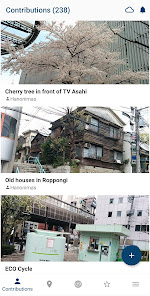
- Upload photos to Commons directly from your smartphone
- Categorize your photos to make them easier for other people to find
- Categories are automatically suggested based on photo location data and title
- View nearby missing images - this helps Wikipedia to have images for all articles, and you will discover beautiful places close to you
- View all the contributions you have made to Commons in one gallery
Using the app is easy:
- Install
- Log in to your Wikimedia account (if you don't have an account, create one for free at this step)
- Select 'From Gallery' (or the picture icon)
- Select the picture that you wish to upload to Commons
- Enter a title and description for the picture
- Select the license that you wish to release your picture under
- Enter as many relevant categories as possible
- Press Save
The following guidelines will help you to understand what photos the community is looking for:
✓ Photos that document the world around you - famous people, political events, festivals, monuments, landscapes, natural objects and animals, food, architecture, etc
✓ Photos of notable objects that you find in the Nearby List in the app
✖ Copyrighted pictures
✖ Photos of you or your friends. But if you are documenting an event it doesn't matter if they are in the picture
✖ Photos of poor quality. Make sure the things you are trying to document are visible on the picture
- Website: https://commons-app.github.io/
- Bug reports: https://github.com/commons-app/apps-android-commons/issues
- Discussion: https://commons.wikimedia.org/wiki/Commons_talk:Mobile_app & https://groups.google.com/forum/#!forum/commons-app-android
- Source code: https://github.com/commons-app/apps-android-commons
Wikimedia Commons 使用排名
基於 Similarweb 的算法,根據過去 28 天的安裝數和活躍用戶數進行計算。
所有類別 在
美國--
攝影 在
美國#375
用戶興趣和熱門類別
Wikimedia Commons用戶使用的熱門類別和應用程式

















 Wikimedia Commons VS.
 1月 13, 2026