

2月5日 的 Icon 3x3: Shortcut Icon Widget 應用程式分析

Icon 3x3: Shortcut Icon Widget
- chlorocube
- Google Play 商店
- 免費版
- 個人化
URL shortcut icon can be placed, too.
Widget menu
- Icon 3x3 in space 2x2
- Icon 2x2 in space 1x1
- Icon 3x1 in space 2x1
- Icon 1x3 in space 1x2 (added in v1.0.10)
- Icon 2x1 in space 1x1 (added in v1.0.11)
- Icon 2x3 in space 1x1 (added in v1.2.4)
- Icon 3x4 in space 2x2 (added in v1.2.4)
- Icon 3x2 in space 1x1 (added in v1.2.5)
Supported
- widget resize
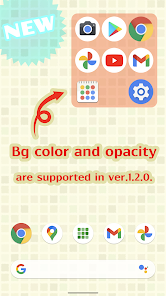
- background color and opacity (added in v1.2.0)
Recommended for you like this
- I want to place many app icons on my home screen!
- I want to place smaller app icons on my home screen!
- I want to place app icons in the lower left or right corner of my home screen where my thumb reaches!
Basic operations in the icon editing screen
1. Choose an app from the app list on the right pane and hold it down.
2. Drag and drop it into any app field on the left pane.
3. Tap the save button on the bottom right lastly.
Supported in the icon editing screen
- Replacing icons
How do you edit icons of the widget that have already been placed?
1. Launch Icon 3x3 app and you will see "WIDGET".
2. Tap the item you want to edit.
How do you change background color and opacity of the widget?
1. Firstly, place the widget on your home screen.
2. Launch Icon 3x3 app and tap "SETTING".
Icon 3x3: Shortcut Icon Widget 使用排名
基於 Similarweb 的算法,根據過去 28 天的安裝數和活躍用戶數進行計算。
所有類別 在
美國--
個人化 在
美國--


 Icon 3x3: Shortcut Icon Widget VS.
 2月 5, 2026