

1月18日 的 Cast for Chromecast - TV Cast 應用程式分析

Cast for Chromecast - TV Cast
- Save Status, Video & Image Downloader
- Google Play 商店
- 免費版
- 工具
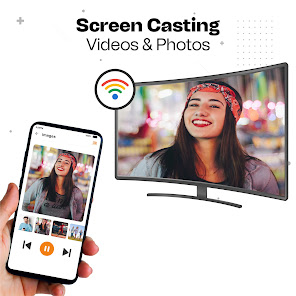
Screen mirroring is the latest phone-to-TV casting app. TV cast for Chromecast allows the user to quickly mirror the phone to the TV screen in high resolution. TV cast app helps cast tablets or phones to TV quickly and stably for screen mirroring. The cast to TV app provides a great experience by casting videos, games, music, photos, and much more on a big screen at a real-time speed. Screencast provides an external widget to quickly connect and cast your phone to the Chromecast for screen mirroring.
Key Features of Cast for Chromecast app
✦Real-time speed without delay.
✦ Easy to use and user-friendly interface.
✦ External widget to quickly connect to screen Miracast.
✦ Cast to TV with just one touch.
✦ Screencast all photos, games, and music easily.
✦ Smart view supports all media files like videos, photos, and audio.
✦ Identify all local media files automatically.
✦ Cast screen in high resolution.
✦ Supports multiple devices.
✦ Simple & fast connection with just a click.
✦ Easily connect smartphone screen to big screen for the screencast.
✦ Protect your data, file, and application.
TV Cast is an easy-to-use and user-friendly app for Screen mirroring. The phone cast app allows convenient live phone screen mirroring for supported apps. Phone Cast works at real-time speed without delay. Smart TV Cast plays videos, music, and broadcast games from your phone to the TV remote. Screencasting easily connects the phone to the Chromecast with the external widget. Phone cast supports all media files like video, audio, & music, etc.
Wireless casting can solve the problem of a shorter screen in family gatherings, business meetings, and video conferences. Screencast connects smartphones to TV wirelessly. Miracasst connects your phone to the TV for a screencast with just a click. Cast to TV app provides a secure connection to protect your data, files, and applications.
How to connect phone to TV
1. Make sure your phone and TV are connected to the same Wifi network and turn off VPN.
2. Enable cast display function on your Chromecast TV.
3. Click the connect button in the TV cast app and enable wireless display.
4. Search for devices and select devices to connect.
5. Enjoy Miracast streaming.
Cast for Chromecast - TV Cast 使用排名
基於 Similarweb 的算法,根據過去 28 天的安裝數和活躍用戶數進行計算。
所有類別 在
美國--
工具 在
美國#2,745
用戶興趣和熱門類別
Cast for Chromecast - TV Cast用戶使用的熱門類別和應用程式














 Cast for Chromecast - TV Cast VS.
 1月 18, 2026