

1月3日的Videocraft - Video Editor Pro应用程序分析

Videocraft - Video Editor Pro
- Mauricio Eastmond
- Apple 应用商店
- 付费
- 照片与视频
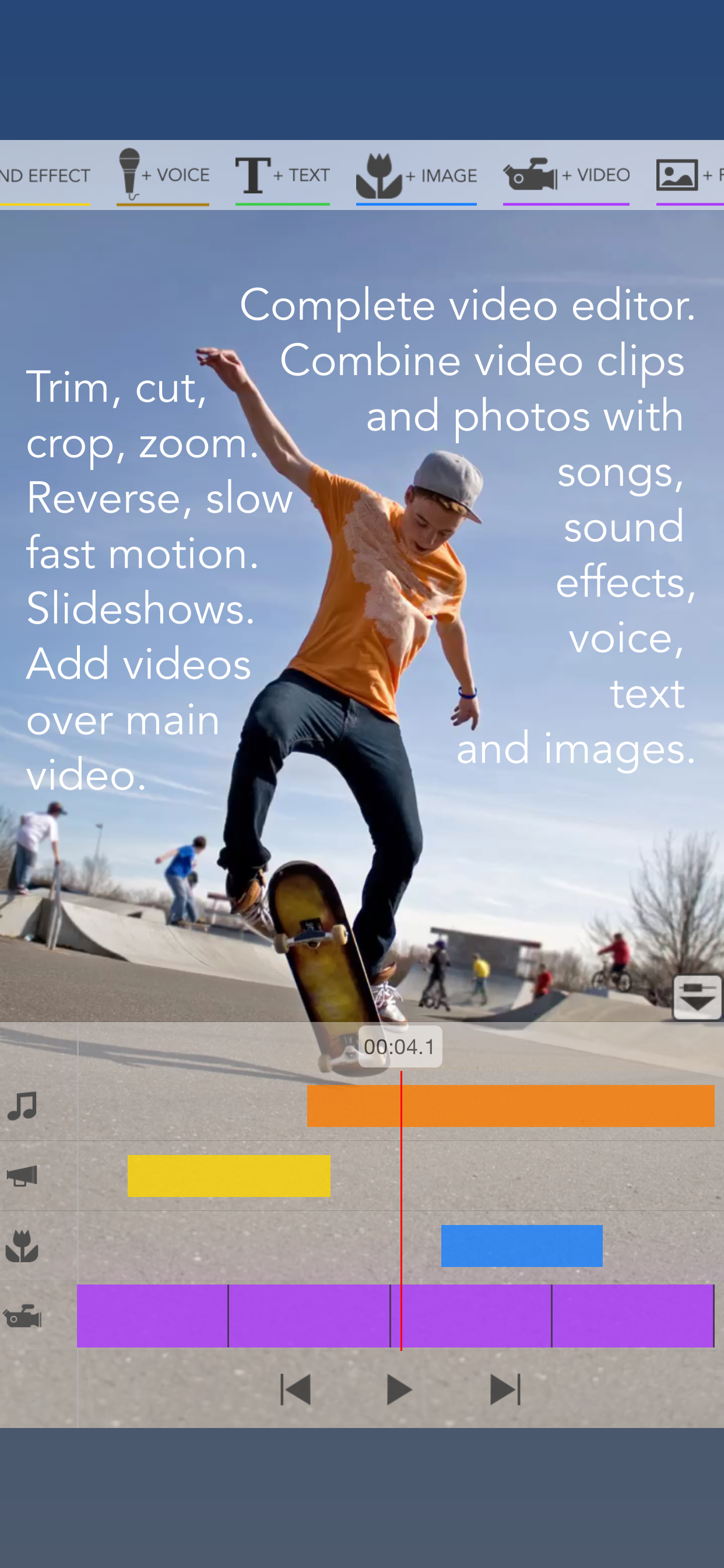
Videocraft is the complete multi-track video editor, photo slideshow and movie maker app. All features one needs to combine video clips and photos with music, sound effects, voice over, images, GIFs and text. With a beautiful and simple design, anyone can create and share amazing videos in minutes.
Feature Highlights:
INTEGRATION WITH FILES
You can use videos, photos, images, GIFs and music that you have stored in iCloud Files.
CHOOSE PROJECT ASPECT RATIO, RESOLUTION AND FRAME RATE:
• Create square (1:1), standard (4:3), wide (16:9) or extra-wide (2:1) projects.
• Landscape or portrait orientation.
• 4K, 1080p or 720p resolution.
• 30fps or 60fps frame rate.
ADD MULTIPLE VIDEO CLIPS AND PHOTOS:
• Add videos and photos from Photos or Files.
• Trim video clips to play just the segment you need.
• Crop, pan and zoom video clips and photos to fill or fit your project aspect ratio.
• Mute video clip audio or adjust its volume.
• Fade in/fade out and crossfade transitions.
• Set the duration of each photo.
• Change video background color.
KEN BURNS EFFECT:
• Create beautiful photo stories where the photos pan and zoom smoothly.
REVERSE VIDEO
SLOW/FAST MOTION
STOP MOTION:
• Convert long videos to stop motion videos.
• Import multiple photos and play then to create stop motion movies.
ADD VIDEO OVER VIDEO (PIP, B-ROLL):
• Add many videos over the main video track.
• Size and position as you like. Play them side by side.
CREATE AUDIO TRACKS FROM VIDEO CLIPS:
• Extract music from videos to use it in your project.
• With this feature you can play the audio of a video before the video shows up, enabling you to make interesting transitions.
BLUR EFFECT:
• Apply blur to those "censored" parts of your video.
ADD MANY MUSIC TRACKS:
• Add songs from Music or Files.
• Trim the songs to play just the segment you want.
• Adjust the volume level.
• Option to mute the main video audio track while playing the song.
• Option to fade-in/fade-out for a smooth transition.
ADD SOUND EFFECTS:
• Add sound effects from the included sound effects library. 120 sound effects, including beeps, human noises, animals, ambiences, cartoon, comical, vehicles, weapons, explosions and more.
ADD VOICE OVER:
• Easily narrate your video.
• Adjust the volume level.
• Option to mute the main video audio track while playing the recording.
ADD IMAGES OVER VIDEO:
• Add images, GIFs, animated stickers from Photos or Files on top of the video.
• Incorporate your own watermarks, borders and overlays.
• Combine text with included images to create callouts.
• Many transitions including wipe, move, scale and fade.
ADD TEXT OVER VIDEO:
• Add text to your video with any font, color, size and position.
• Includes all fonts installed in the device.
• Change text color, shadow color and background color.
• Many transitions including wipe, move, scale and fade.
EASY TO USE VIDEO EDITOR TOOLS:
• Add tracks using the buttons in the toolbar.
• Each track is represented by a bar in the timeline.
• Access track options by tapping on its icon to the left.
• Drag the bar to change its position.
• Drag the bar handles to change the duration.
• Duplicate bars for easy re-use.
• Pinch the timeline to zoom in or out.
• Reorder video clips by dragging its purple bar.
• Undo/redo option.
GALLERY
• Projects are saved in the gallery so you can continue the work at any time.
• Rename and make copies of your projects to try different things.
EXPORT YOUR CREATION:
• Export your project as a new video in Photos.
• Export the current frame as a new photo in your Photo library. It is perfect if you want to use the app to create memes by combining photos and text or simply to extract a frame from your video.
For any questions, feedback and support, please contact us:
Gamelarious: http://gamelarious.com
Feedback: feedback@gamelarious.com
Support: support@gamelarious.com
Twitter: @gamelarious
Facebook: facebook.com/Gamelarious
商店排名
商店排名基于 Google 和 Apple 设置的多个参数。
所有品类在
美国--
照片与视频在
美国--


 Videocraft - Video Editor Pro VS.
 一月 3, 2026