

1月13日的Remote for Smart Samsung TV应用程序分析

Remote for Smart Samsung TV
- BoostVision
- Google Play 商店
- 免费
- 房屋与家居
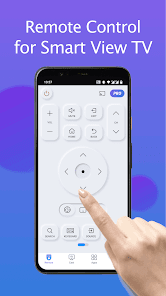
Fed up with endless searches for your Samsung TV remote? Dismayed by the hassle of outdated controller devices? Your answer is right here! TV Remote for Samsung Control is a free Samsung smartthings remote controller app for Samsung Smart TV. This fast and stable Samsung controller app works as a genuine Samsung TV remote and is compatible with the mainstream Samsung series smart TVs like Samsung 7 series TV, Samsung 6 series TV, Samsung Curved TV and K-Series (2016+) Samsung Tizen models etc.
With this fully functional Samsung replacement remote app, you never worry about a dead or malfunctioning physical controller, nor misplacing the Samsung TV original remote! Upgrade to our mobile Samsung remote app for effortless control and no more constant battery replacements. Simplify your life and go eco-friendly. Get the user-friendly Samsung smart remote by downloading TV Remote for Samsung Control today!
Features:
- Auto detect your Samsung smartthings TV on the same WIFI network
- Keyboard feature to simplify text input and search on Samsung Smart View TV
- Power on/off TV, adjust volume, control channels, change navigation mode, etc.
- Quick access to your favorite channels and apps on TV in a few taps
- Mirror phone/tablet screen to smart TV with Samsung remote control app in high resolution
- Cast local photos/videos and web videos to Samsung smartthings TV
How to connect to TV with this Samsung universal remote:
1. Open and go to the main interface of this Samsung control app
2. Click the device button in the top right corner to get the device list
3. Choose the device you want to connect the smart remote to
4. Finish! Enjoy the all-in-one Samsung smart control now!
Now it’s time to turn your phone into a Samsung remote controller app and experience a smarter, more convenient way of controlling your Samsung televisions!
Troubleshoot:
• TV Remote for Samsung Control can only work when it is on the same WiFi as the smart view TV.
• Reinstalling this TV control app and rebooting the TV can fix most of the connecting issues.
• Upgrade the TV remote application to the latest version can solve some connection issues.
• For connection issues with mobile devices, try downloading the smartthings app to another device.
DISCLAIMER:
BoostVision is not an affiliated entity of Samsung Electronics. And the "TV Remote for Samsung Control" application is not an official product of Samsung or its affiliates. Due to the limited number of Samsung smart TV models we can test, our app can't be compatible with all TV models.
Terms of Use: https://www.boostvision.tv/terms-of-use
Privacy Policy: https://www.boostvision.tv/privacy-policy
Visit Our Page: https://www.boostvision.tv/app/samsung-tv-remote
Remote for Smart Samsung TV 使用排名
使用率排名基于 Similarweb 的算法,该算法会计算 28 天内的当前安装量和活跃用户数。
所有品类在
德国--
房屋与家居在
德国#148
用户兴趣点和热门类别
Remote for Smart Samsung TV 用户使用的热门类别和应用程序












 Remote for Smart Samsung TV VS.
 一月 13, 2026