

12月24日的AndroCalc Spreadsheet editor f应用程序分析
AndroCalc Spreadsheet editor f
- OffiDocs Mobile Apps
- Google Play 商店
- 免费
- 生产力
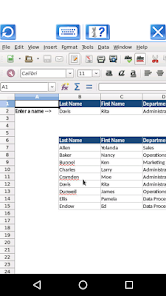
AndroCalc is a XLS spreadsheet editor that supports different document formats, including .xls, .xlsx and .ods. Its main features are:
- Includes a navigator to find sheets, range names, database ranges, linked areas, graphics, OLE objects, comments, and drawing objects inside the xls xlsx spreadsheets.
- Includes a lot of common functions to create formulas.
- Allow to build macros.
- Provides flexible cell formatting options:
+ Rotating contents,
+ Backgrounds,
+ Borders,
+ Align data within a cell,
+ Bold, italic, underlined data,
+ Change the color of a cell.
- Values can be validated by providing a type of content: time, date, or decimal.
- Allow that xls data can be sorted and filtered as well as positioned in a pivot table.
- A sheet can be protected with a password.
- Insert pictures, videos, sound files, charts, and special characters
- Formats supported:
+ OpenOffice.org 1.x Spreadsheet (.sxc)
+ OpenOffice.org 1.x Spreadsheet Template (.stc)
+ Microsoft Excel 97/2000/XP (.xls and .xlw)
+ Microsoft Excel 97/2000/XP Template (.xlt)
+ Microsoft Excel 5.0 and 95 (.xls and .xlw)
Note that the AndroCalc app has its own instructions when the document is being edited remotely. It has several buttons for the operations:
- "Write mode", use a finger to modify the document.
- "Move mode", drag your two fingers to move the app and the document with your fingers.
- "Zoom In & Out", swipe your two fingers to zoom in or zoom out the app and document.
- "Save the document" -> "Click in File > Save the document opened keeping the current format" to save the document in the server. It will be saved locally when you click in Exit button.
- "KeyBoard", which opens or closes the phone keyboard that allows you to write any text.
- "Exit", which closes the editor view and saves locally the document as it is downloaded from the cloud.
AndroCalc also contains a file manager module with the following functionality:
- Home directory when you first load the file manager.
- All operations with files and folders: copy, move, upload, create folder/file, rename, archive, extract, edit, etc.
- Bookmarks over the files or directories.
- View the file or directory properties: name, location, size, date.
- Light and Elegant client UI supporting phones and tablets.
- Grid, List and Icons views available.
- Sort by name, last modified, size or type.
- FTP access integrated.
- Search for files
- Recent files
- Open Source
Note that this application uses our OffiDocs online platform. The document are uploaded to a confidential repository server where the documents are edited from. After the edition has been completed, the document are removed from the our OffiDocs platform.
The confirmation of a privacy policy agreement is required and has been included in the app.
AndroCalc Spreadsheet editor f 使用排名
使用率排名基于 Similarweb 的算法,该算法会计算 28 天内的当前安装量和活跃用户数。
所有品类在
巴西--
生产力在
巴西--
用户兴趣点和热门类别
AndroCalc Spreadsheet editor f 用户使用的热门类别和应用程序




















 AndroCalc Spreadsheet editor f VS.
 十二月 24, 2025