

12月28日的Bass Engineer应用程序分析

Bass Engineer
- GyokovSolutions
- Google Play 商店
- 付费
- 音乐与音频
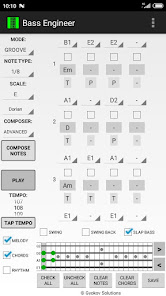
Bass Engineer is a bass guitar grooves and solos auto-composition app. It helps composing bass grooves and solos and accompanying harmony. No matter if you are a professional musician or just music enthusiast it will help you think out of the box and unlock your creativity.
This is extended version of free app Bass Engineer Lite - https://play.google.com/store/apps/details?id=com.gyokovsolutions.bassengineerlite
with many additional features:
- save melody and harmony as midi and text file
- change number of notes up to 64
- open saved melody
- many more scales
- customizable guitar tuning with up to 6 strings
- change number of frets on fretboard
- natural harmonics and slide articulation
- EXPERT auto composer
- harmonize melody - auto compose new harmony over existing melody
- AUTO MODE - when this mode is active then composed melody is repeatedly played and auto composed every 2 cycles and the good melodies can be saved while listening
- transpose melody up and down
- create custom instrument with your own sound samples
There are two methods for composition:
- manual - you select notes and chords
- automatic - using the AUTO COMPOSER
The COMPOSE ALL app feature creates a new melody and accompanying harmony from scratch.
The notes, chords and note articulation are changed using the drop down menus for each note.
If you want to auto compose some notes of melody just check them and press Compose Notes button. Then the notes will be composed for you.
How can you use it:
At app start wait for all sounds to load.
1. Select GROOVE or SOLO mode, tempo, note scale and note length.
2. Create melody rhythm by checking the checkboxes below the notes.
3. Press COMPOSE NOTES button to generate the notes for selected rhythm.
4. Listen to melody repeatedly and tweak the notes manually or with the help of auto composer by leaving checked the notes targeted for change .
You can play melody, harmony or rhythm by checking corresponding check boxes.
AUTO COMPOSER selects notes for these positions where the checkboxes are checked. If no notes are checked then melody is composed from scratch.
AUTO MODE - when active the melody is autocomposed every 4 (changeable in Settings) cycles. During playing you can save the composed melody via Save button.
Three types of AUTO MODE are available:
1. When AUTO MODE is active and COMPOSE ALL is selected then both melody and harmony will be autocomposed every 4 cycles. The text below button PLAY will show "AUTO ALL".
2. When AUTO MODE is active and COMPOSE NOTES is selected then melody only will be autocomposed every 4 cycles. The text below button PLAY will show "AUTO NOTES".
3. When AUTO MODE is active and COMPOSE CHORDS is selected then harmony only will be autocomposed every 4 cycles. The text below button PLAY will show "AUTO CHORDS".
The app manual - https://gyokovsolutions.com/manual-guitar-engineer
Here are some videos that explain user interface.
- Play controls - https://www.youtube.com/watch?v=94EJzS3xmkM
- Edit controls - https://www.youtube.com/watch?v=BypNdXy3Jso
- auto composing melody and harmony - https://www.youtube.com/watch?v=RFki1tDvtvo
- AUTO MODE - https://www.youtube.com/watch?v=C6y2VNgFpCE
App privacy policy - https://sites.google.com/view/gyokovsolutions/bass-engineer-privacy-policy
Bass Engineer 使用排名
使用率排名基于 Similarweb 的算法,该算法会计算 28 天内的当前安装量和活跃用户数。
所有品类在
美国--
音乐与音频在
美国--



 Bass Engineer VS.
 十二月 28, 2025