

12月26日的KReader PRO应用程序分析
KReader PRO
- HK App - Kindle App Release
- Google Play 商店
- 付费
- 工具
KReader is an easy to use and highly configurable reading app that supports most popular document formats, including: PDF, EPUB, EPUB3, MOBI, DjVu, FB2, FB2.zip, TXT, RTF, AZW, AZW3, CBR, CBZ, HTML, XPS, MHT and more.
With its simple, yet powerful interface, Kindle Book makes document reading a true pleasure. KReader even features a unique auto-scrolling, hand-free music mode.
Some of KReader main features include:
✓ Easy document discovery with optional and configurable lists:
● Auto-Scan (with user selected folders)
● Browse (with an in-app file explorer)
● Recent (with a progress percentage bar)
✔ Opening documents from email, file managers and other sources
✓ Support for bookmarks, annotations, and quick-jump contents
✓ Individually configurable Day and Night modes
✓ Support for many popular translators and offline dictionaries
✓ Vertical scrolling lock
✓ Auto-centering of documents
✓ Single page view of dual paged documents
✓ Music mode with configurable scrolling speed
✓ Voice reading capability (via TTS Engine or "text to speech")
✓ Fast and easy document searching
✓ Word search in multiple documents
✓ Online document format conversion
✓ Opening of files directly from archives (.zip)
✓ Right to left language support (Thai, Hebrew, Arabic, etc.)
✓ Continue reading from where you left off
✓ Online Catalogs (OPDS), search and download books
✓ search and download books online
✓ Much, much more.....
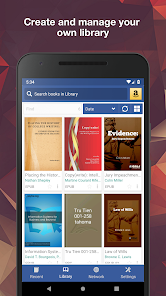
With KReader, you can easily create self-maintained libraries of all your documents by specifying which formats to include and which folders to scan.
All document collections can be viewed in either a list or grid pattern.
Documents are easily identified by size-adjustable thumbnail covers and detailed descriptions.
Your library can be sorted by path, name, size, or date and, there is a filter to help locate specific documents or document groups.
While reading, documents can be locked into a vertical only scrolling mode and can be set to either page or screen flipping.
Text can be reflowed and annotated. Volume keys can be configured for scrolling and backgrounds customized.
Excerpts can be translated, shared, copied, and searched on the internet.
The list of features goes on and on!
But, the only way to truly appreciate KReader is to use KReader.
Try the free, ad supported version first and decide for yourself; you won't be disappointed.
When you are convinced, to help support further development, please purchase an ad free, PRO license.
KReader PRO 使用排名
使用率排名基于 Similarweb 的算法,该算法会计算 28 天内的当前安装量和活跃用户数。
所有品类在
美国--
工具在
美国--




 KReader PRO VS.
 十二月 26, 2025