

12月7日的PDF Utility - PDF Tools - PDF应用程序分析
PDF Utility - PDF Tools - PDF
- iLite Infosoft
- Google Play 商店
- 付费
- 生产力
PDF Reader, PDF Viewer, PDF Tools & PDF Utility.
PDF Reader - PDF Tools an ultimate combination of 17 PDF Tools & Utilities with PDF Editor.
PDF Reader: Quickly open and read the pdf file with inbuilt pdf reader & pdf viewer.
Zoom In & Zoom out in PDF Reader
Scroll horizontal (Book Reading View) or Scroll vertically continues page mode in pdf viewer
Jump to specific pdf page in pdf reader
Bookmark the content of the pdf with notes for future reference
Night mode in pdf reader for comfortable reading in night
Read password protected PDF
Jump to specific page from PDF content & index
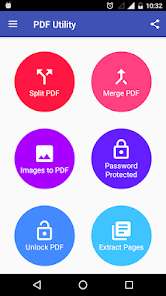
Split PDF: Split a PDF file at a particular page into multiple files. Now no worries about a large file to split.
Merge PDF: Select two or more PDF and merge into a Single PDF Document.
Images to PDF(PNG to PDF or JPG to PDF): Select one or more images to create a PDF files of it. Now enjoy an album of your golden memory into PDF and share it with anyone.
Lock PDF (Encrypt PDF): Enjoy an unlimited privacy of your PDF Document by encrypting it with a Password.
Unlock PDF (Decrypt PDF): Remove password from a PDF to enjoy hassle free access.
Extract Pages: Extract specific pages from a PDF.
Extract Images: Extract all images from a PDF.
Rotate PDF Pages: Rotate specific page of PDF. Portrait to Landscape & Landscape to Portrait by an angle 90,180 or 270 clockwise.
Reorder PDF Pages: Reorder the pages of PDF by changing an order of pages by drag & drop on long press.
Delete PDF Pages: Delete specific pages from a PDF
Add Background Color or Add Background Image to PDF: Select any color or image to apply it to the background of PDF
Add/Edit Metadata of PDF: Add/Edit Metadata of PDF will allow to add or edit Title, Author, Creator, Producer, Subject, Keywords of PDF
Add Text watermark to PDF: Apply a text watermark to all pages or specific pages of PDF with many other option e.g Watermark Position(Top, Center, Bottom), Watermark Font Style (Normal, Bold, Italic, BoldItalic), Watermark Rotation (0 degree, 45 degree, 90 degree, 135 degree), Select the watermark placement type(Over Content or Under Content), Watermark Font Size, Watermark Font Color.
Add Image watermark to PDF:Apply an image watermark to all pages or specific pages of PDF with many other option e.g Select the watermark placement type(Over Content or Under Content), Watermark Opacity, Watermark Size (Full/Fit Screen or Can select specific size).
Add Empty/Blank Pages: Add an empty/blank pages to specific page of the PDF.
Delete Blank Pages: Delete blank pages from a PDF automatically.
** Download & check ultimate pdf tools app with pdf reader feature.
** If you have any suggestion to make an app even better or if you want to contribute to translate the app in your language, please connect with us contactus.appstore@gmail.com
PDF Utility - PDF Tools - PDF 使用排名
使用率排名基于 Similarweb 的算法,该算法会计算 28 天内的当前安装量和活跃用户数。
所有品类在
美国#547
生产力在
美国#69



 PDF Utility - PDF Tools - PDF VS.
 十二月 7, 2025