

1月27日的Moon on Wear应用程序分析

Moon on Wear
- kroegerama
- Google Play 商店
- 付费
- 图书与参考资料
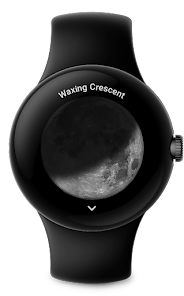
Displays a large, realistic moon. With correct rotation corresponding to your location. Optimized for Wear OS.
Has a number of complications to add to your own watchface:
• Moon phase (Percent)
• Moon phase (w/ description)
• Small Image
• Large Image (can be used as wallpaper, if your watchface supports this)
• Moonrise and moonset
Comes with a Moon-Tile. A view, you can put next to your watchface.
The app can show you the following information:
• Moon phase (percent)
• Moon rise / set
• Moon cycle (age in days)
• Current distance from earth
• Upcoming moon phases
• Upcoming super moons
FAQ
How accurate are the calculations?
The algorithms used are designed to be as efficient and battery-saving as possible. As a result, slight inaccuracies may occur. The values should be comparable with websites like timeanddate com and mooncalc org.
Why does the app show different values than those of 'Moonphase' complication from Google?
The Google Complication shows what percentage of 180° is illuminated. We show the illuminated area of the lunar disk in percent.
Why are the moonrise and moonset times different from other apps?
This is because we always display the upcoming times. Most other apps always show moonrise and moonset from the current day, even if the respective times are in the past.
How can I set the moon as the background of my watchface?
For this, the watchface must support a special complication type called 'LARGE_IMAGE'. If your watchface does not support this, you can ask its developer if this feature is planned.
How can I choose the complication type?
This decision is made by the developer of your watchface. They decide at which position which complication types (text, icon, image) can be displayed.
What is the location permission needed for?
The location permission is optional. In order to calculate the exact rotation of the moon, the approximate location of the observer must be included in the calculations. All calculations take place offline on the device. The location is not transmitted to the Internet at any time.
Why is the location not detected?
If you have granted the location permission, it may take quite a while until it is also displayed in the app. This is because we do not want to unnecessarily drain the smartwatch's battery.
At which accuracy is the location retrieved?
Only the approximate location is retrieved. Google calls this level of accuracy 'COARSE LOCATION'.
Moon on Wear 使用排名
使用率排名基于 Similarweb 的算法,该算法会计算 28 天内的当前安装量和活跃用户数。
所有品类在
美国--
图书与参考资料在
美国--



 Moon on Wear VS.
 一月 27, 2026