

12月3日的NRG Player music player应用程序分析
NRG Player music player
- NRG Software
- Google Play 商店
- 免费
- 音乐与音频
NRG Player - beautiful music player for Android with an equalizer that plays songs from folders and has customizable user interface.
Main features:
• Popular music format playback
Listen to songs in more than 20 popular formats.
• Lossless formats (.FLAC, .ALAC, .APE)
Listen to tracks in formats without quality loss, which your default music player couldn’t play before. Our application has it’s own audio engine.
• 10 band graphic equalizer with presets
Choose standard presets or create your own. To open it tap EQL button on the right bottom corner. Then tap on On/Off button to switch it on/off.
• Sound effects
Get the best quality from your headphones using them with flexible effects. Open equalizer and swipe to the second tab with effects.
• Custom interface colors and background
Change look and feel depending on your own style. Express yourself! To customize your interface tap options menu (small gear in the top right corner or menu button on your device). Then tap on Settings -> Look and feel -> “Colors and Background” or “Skins” to change whole look of the player.
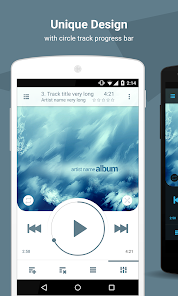
• Convenient circle rewind for audiobooks and podcasts
Tweak rewind speed for easy navigation in long tracks. Open Settings -> Controls -> Rewind speed. For example, x1/8 speed allows you to rewind in 8 full circles instead of one. It makes your navigation eight times easier.
• Volume buttons playback control
Switch tracks with volume buttons. You don’t need to pull out your phone from your pocket. It’s a great way to use NRG Player for sport. To switch on this feature open Settings -> Controls -> Volume buttons.
• Switch folders, albums or artists in one motion
Open media library by tapping on ADD button in the left bottom corner. Find your favorite directory, album or artist and tap on small play triangle button on the left side of the list item. Return to the main screen. Now you can swipe to the right or to the left on the playback queue to switch. Use NRG Player as your music player for car.
• Play all your collection in three taps
1. Tap on ADD button to open media library.
2. Tap on “Songs” tab
3. Tap on play icon in the left side of any item in the list
Playback queue will be created automatically for you. You can switch on "random" on the main screen (above forward button).
• Unique playlist system
You can select tracks in 5 categories: folders, songs, albums, artists and genres. Add them all to playlist in one touch. There are no borders between directories and media library anymore. Just press ADD button on the left bottom corner. Then tap on checkboxes on the right side of any list item. When you select everything you want just press “Add” or “Play” button.
• Home screen and lock screen widgets
You can choose one of three home screen widgets: 4x1, 4x2, 4x3, and one lock screen widget!
• Headset support
Leave your device in the pocket! You can tweak your headset on the Settings screen: Settings -> Controls -> Headset.
• Id3 tags editor
You don't need to edit every track if you want to change album or artists title. Just open tag editor in album or artist category. To do that open music library, select required tab and make a long press on a list item to open context menu. Then just select “Edit tags” option. All changes will be applied automatically.
• Sleep timer
Don’t worry about sleeping with player on. It’s turn off automatically by sleep timer. To open sleep timer tap on Settings -> Controls -> Sleep timer.
Use support@nrgplayer.com for bug reports.
NRG Player music player 使用排名
使用率排名基于 Similarweb 的算法,该算法会计算 28 天内的当前安装量和活跃用户数。
所有品类在
美国--
音乐与音频在
美国#831











 NRG Player music player VS.
 十二月 3, 2025