

1月28日的Creative Cast应用程序分析

Creative Cast
- Optoma Corp.
- Google Play 商店
- 免费
- 沟通
Creative Cast makes it possible to connect Android devices to Optoma displays (projectors, interactive flat panels and LED displays). Once connected you will be able to mirror your screen, share images, documents and videos, along with live broadcasting via your camera.
Functionality
Multiple devices
- Supports multiple devices for easy content sharing
Screen-mirroring
- Share your screen on an Optoma display (with supported apps)
File sharing
- Easily share documents (PDF) and images (JPEG and PNG) to connected displays
Wireless camera
- Share images in real-time via the camera on your base device
Getting started
Use the steps below to establish a connection between a terminal (TX) display, projector or IFP (RXs) and the Creative Cast App.
1. Launch the Creative Cast App on your Android device and Optoma display
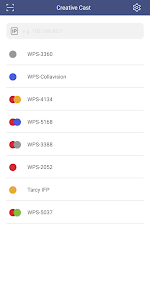
2. Creative Cast will display all connectable devices on the same network
3. Select the display you want to connect to
4. Navigate the home screen to select the required features and functions
Visit the Optoma website for information on supported models
www.optoma.com
Creative Cast 使用排名
使用率排名基于 Similarweb 的算法,该算法会计算 28 天内的当前安装量和活跃用户数。
所有品类在
德国--
沟通在
德国--
用户兴趣点和热门类别
Creative Cast 用户使用的热门类别和应用程序















 Creative Cast VS.
 一月 28, 2026