

12月24日的Unlock PDF : Remove PDF Passwo应用程序分析

Unlock PDF : Remove PDF Passwo
- raincontinues
- Google Play 商店
- 免费
- 工具
this Unlock PDF Application is the Best PDF Password Remover
this Unlock PDF App is free and easy to remove password pdf from pdf file.
you can decrypt pdf file only in seconds.
unlike unlock online service app that needs internet connection,this pdf password remover app is offline without internet connection.
this pdf password remover is completely free,no need to pay
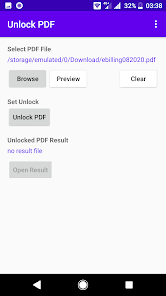
to decrypt protected pdf file just select pdf file that you want to remove password
just click unlock button this application will remove password protected pdf to unlocked pdf file seconds
this pdf password remover is so fast
no need to unlock pdf online free service anymore because it is not secure because your pdf file is uploaded to their server
how to decrypt password pdf file into unlocked pdf file?
let me show you how to remove password pdf file
first of all,select password protected pdf document in your android device that you want to remove password pdf into unlocked pdf document
this unlock pdf app not only free download on playstore,this split pdf application also small size,only 5 Mb
and also decrypt pdf file in fast speed
our app will decrypt pdf into unlocked pdf file and also rename file automatically
this app unlock pdf is free to use forever to remove password from protected pdf
this is the best pdf password remover application/software
PDF (Portable Document Format) format is currently widely used around the world created by Adobe.
PDF format is hard to edit, and it can ensure that no matter where the user opens the file, there will be no garbled characters.
but this format so popular,many businesses, schools, etc. are loving using this format to store their document.
File encryption is also very common on PDF files.
Many companies are often encrypt files for security.
so the PDF files can not be edited or copied by no authorized people.
There are 3 types of PDF encryption, 40, 128 and 256 bits.
The most secure of these is 256 bit.
Method 1 - Unlock PDF with EasePDF
Many people will first think of Adobe Acrobat when they need to edit PDF files for the reason that Adobe created PDF, which is definitely the best and most professional software. But Adobe Acrobat is a paid software, and the decryption process is more complicated than others. If you just want to convert an encrypted PDF file into a publicly editable and readable PDF file, and you have a password, you can find other PDF editors to help you, such as EasePDF.
EasePDF has both Protect PDF and Unlock PDF. When you encrypt files, EasePDF will ensure maximum file security through a 256-bit encryption. But users need to mark down their password when encrypting because if you don't have a password, you can't decrypt it successfully. Most PDF editors cannot decrypt PDF files without a correct password. There are two reasons. One is to prevent files from being decrypted and stolen by unauthorized people. The other is the decryption process is time-consuming. Users are usually required to provide a password for fast decryption.
this Unlock PDF Android Application is designed to convert an encrypted PDF file to a file that can be edited, copied, and read publicly with remove password users quickly and easily.
the best choice to quickly decrypt PDF files.
1. Open this Unlock PDF Android Application.
2. Select your protected PDF file from your device.you will be asked password for loading the file
3. Tap Unlock PDF Button.
4. wait for the decryption in seconds
5. now you can open your unlocked pdf version
Unlock PDF : Remove PDF Passwo 使用排名
使用率排名基于 Similarweb 的算法,该算法会计算 28 天内的当前安装量和活跃用户数。
所有品类在
德国--
工具在
德国--
用户兴趣点和热门类别
Unlock PDF : Remove PDF Passwo 用户使用的热门类别和应用程序









 Unlock PDF : Remove PDF Passwo VS.
 十二月 24, 2025