

2月6日的Seasonal Nature - Wear OS应用程序分析

Seasonal Nature - Wear OS
- RECREATIVE Watch Faces
- Google Play 商店
- 付费
- 个性化
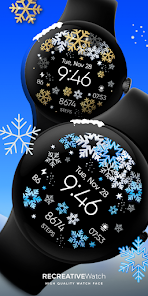
Customizable Wear OS Watch Face for all seasons 🌸❄️🍂🌞. Dive into the spirit of each season with our unique watch face, perfect for winter, autumn, summer, and spring. Celebrate Easter with festive designs, bloom with spring flowers, cool off with summer vibes, embrace autumn leaves, and cozy up with winter snowflakes. Bring your wrist to life and stay in tune with the changing seasons. 🐣🌼🍁❄️
Powered by Watch Face Format
⚙️ Phone App Features
The phone app is simply a tool to facilitate installation and locating the watch face on your Wear OS watch. Only the mobile app contains ads.
⚙️ Watch Face Features
• 12/24h Digital Time
• Date
• Battery
• Steps Count
• 2 customizable Complications
• 2 shortcut Complications
• Multiple Color Variations
• Always ON Display
🎨 Customization
1 - Touch and hold display
2 - Tap on Customize option
🎨 Complications
Touch and hold display to open customization mode. You can customize the field with any data you want.
🔋 Battery
For better battery performance of the watch, we recommend disabling the "Always On Display" mode.
✅ Compatible devices include API level 33+ Google Pixel, Galaxy Watch 4, 5, 6, 7 and other Wear OS models.
Installation and troubleshooting
Follow this link: https://www.recreative-watch.com/help/#installation-methodes
Watch faces don't automatically apply on your watch screen after the installation. That's why you must set it on your watch's screen.
💌 Write to support@recreative-watch.com for assistance.
Seasonal Nature - Wear OS 使用排名
使用率排名基于 Similarweb 的算法,该算法会计算 28 天内的当前安装量和活跃用户数。
所有品类在
美国--
个性化在
美国--


 Seasonal Nature - Wear OS VS.
 二月 6, 2026