

12月24日的WeSmile Smileys (WASticker)应用程序分析

WeSmile Smileys (WASticker)
- SiA - Smileys, Stickers, animated GIF & Emoji apps
- Google Play 商店
- 免费
- 个性化
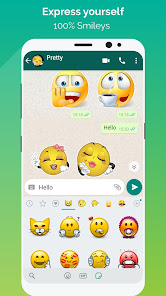
💚 WeSmile is a free application with a wide range of smileys covering all moods, to be shared via WhatsApp (WASticker)!
We've selected the best smileys. They're all free and in a high resolution (HD).
Enjoy this great WhatsApp sticker app right now - it's 100% smileys!
300 smileys, 10 families;
1- The entertainers
2 -The famous ones
3- The famous ones with text
4 - The tinies
5- The little yellows
6- The jokers
7- The shinies
8 - The mustaches
9- The drawings
10- The signs
How does it work?
Add stickers to WhatsApp (WASticker)
Open the category you want to add. Tap on “Add to WhatsApp”.
Open WhatsApp, tap the smiley icon “😀”
Tap the stickers icon 🗒 at the bottom.
Your new smiley category will appear in the list with a small green dot indicating that it is new. You can enjoy and send your new smileys to your WhatsApp friends 👏
Add to / Remove from favorites in WhatsApp (WASticker)
You can add a smiley to your favorites by long pressing on it.
You can remove a smiley from your favorites by opening the favorites category and long pressing on it.
Share stickers with your WhatsApp friends
Your friends do not need the app to see your stickers, but we will be happy if you share our app with our friends! 😉
Your friends can open the app by long pressing on a sticker on their WhatsApp
You can share the app link in the app via the “Share” menu
Share smileys with all your messaging applications
Each smiley can be shared with any of your favorite chat applications. Tap on a smiley and select the desired messenger application.
Remove stickers to WhatsApp (WASticker)
Open WhatsApp, tap the smiley 😀icon close to the keyboard, then tap the ✚ icon at the end of the sticker categories tab.
Tap “My Stickers” tab and remove categories you don’t want anymore. Don’t worry you can add it again later.
My stickers disappeared from WhatsApp (WASticker)?
It can be caused by your phone manufacturer that tries to optimize your battery.
To avoid that you can try this solution, go in your device Settings / Battery / WhatsLov Stickers and select "Don't optimise" (or equivalent as it depends on the device/manufacturer)
Rate us 5 stars ⭐⭐⭐⭐⭐ if you are happy with the app.
🏃 Follow us 🏃
● Facebook: @EmojiShareItAgain or Whatsmiley
● Instagram: whatsmiley
● Google Play developer page: Share It Again - Smileys & Emoji Apps. Discover here all our free emoji apps.
💌 Contact us 💌
● contact@shareitagain.co
● Feel free to ask for a new smiley or feature.
Thank you!
Share It Again company
We make apps for love & fun
WeSmile Smileys (WASticker) 使用排名
使用率排名基于 Similarweb 的算法,该算法会计算 28 天内的当前安装量和活跃用户数。
所有品类在
巴西--
个性化在
巴西--
用户兴趣点和热门类别
WeSmile Smileys (WASticker) 用户使用的热门类别和应用程序















 WeSmile Smileys (WASticker) VS.
 十二月 24, 2025