

1月18日的Zoho Assist - Remote Desktop应用程序分析
Zoho Assist - Remote Desktop
- Zoho Corporation
- Google Play 商店
- 免费
- 生产力
Zoho Assist - remote desktop software helps you remotely control a computer right from your Android device through the remote desktop app. Not only that, you can provide remote support for unattended computers as well. Help customers no matter where you are. Deliver seamless remote support to your customers when they need it the most.
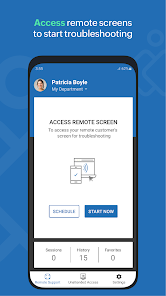
Easily invite customers to a remote support session
Send an invite to the remote session from the Zoho Assist - Technician app or share the invitation URL with customers. You will be instantly connected to your customer’s computer as soon as they accept the invite or click the URL.
Access unattended remote computers
With the Zoho Assist - Technician app, you can control your customer’s unattended remote computer no matter where you are. That means, you can troubleshoot on remote computers without even needing the customer to be in front of it.
Multiple monitor navigation
Navigate between any number of monitors connected to the remote desktop. Active monitor detection is done automatically.
Take instant screenshots
Zoho Assist remote access software Capture screenshots instantly with a single tap. Use the images to go through issues and troubleshoot later.
File transfer
Transfer files to and from your android device during a remote access session. Send and receive files even to a remote unattended computer.
Always secure
Zoho Assist uses advanced 128 bit and 256 bit AES encryption. All remote support sessions are secure and reliable.
Picture-in-picture
This mode enables you to view the on-going remote access session's screen outside the app, while you browse across other apps in your mobile.
How it works
Step 1: Open the Zoho Assist - Technician app. Enter the customer's email address to invite them to the remote support session. Alternatively, you can copy and send them the URL directly.
Step 2: The customer will be connected to the session once they click the invitation URL. Now you'll be able to see what the customers see. And also remotely control the customer's computer.
Step 3: Chat with the customer provide guidance. You can also choose to invite another technician to troubleshoot the issue together.
Please write to assist@zohomobile.com and tell us about your experience. Also, if you want to provide remote support for a customer's android device, ask your customer to download our Customer app here:
https://play.google.com/store/apps/details?id=com.zoho.assist.agent
Zoho Assist - Remote Desktop 使用排名
使用率排名基于 Similarweb 的算法,该算法会计算 28 天内的当前安装量和活跃用户数。
所有品类在
美国--
生产力在
美国#2,098
用户兴趣点和热门类别
Zoho Assist - Remote Desktop 用户使用的热门类别和应用程序















 Zoho Assist - Remote Desktop VS.
 一月 18, 2026