

12月3日的PenToPRINT Handwriting to Text应用程序分析

PenToPRINT Handwriting to Text
- Serendi LTD
- Google Play 商店
- 免费
- 生产力
“The best handwriting to text app”, “the most accurate handwriting OCR!”
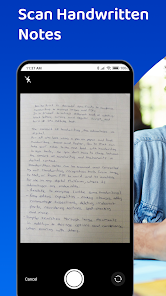
Pen to Print is converting scanned handwritten notes into digital text available for editing, searching, and storage on any digital platform.
Use this unique OCR scanner to scan, recognize and convert handwriting to text that can be edited, searched, and stored on any device or cloud service. It’s a great cursive reader and makes reading illegible writing easier and faster.
Our unique handwriting to text OCR (Optical character recognition) engine extracts handwritten texts from scanned paper notes and turns them into digital editable text. Unlike other OCR scanner apps, it is designed specifically to recognize handwriting from image to text, and works great as a cursive reader and deciphering illegible handwriting.
Upgrade to a premium plan to edit your text, save it to files, copy it, email it (to yourself or to others), add to Notes, or share on messaging apps available on your device. We recommend starting by converting an image to text and trying the handwriting recognition for free, and only then purchasing a premium plan, after evaluating the quality of results the app provides in converting handwriting to text.
Although Digital text is easier to edit, search and store, handwriting on paper notes is still commonly used, since it's fast, easy, and accessible. Pen to Print's handwriting recognition (OCR) is an excellent solution for those who still like the feel of pen on paper, but want to enjoy the benefits of digital. It is easy to use, fast and affordable.
Converting handwriting to text with Pen to Print is a perfect solution for cursive reading and illegible writing, for students, for sharing meeting minutes, protocols, and other handwritten documents with multiple participants.
Please note:
The success of handwriting recognition relates directly to the quality of your scanned image. For best results scan your document in a well-lighted area, and make sure the paper is straightened and not folded or skewed. Verify that your image is focused and in decent quality. If unsuccessful, just try scanning again, it might make all the difference when converting the image to text.
The app currently supports Latin script only.
Our handwriting recognition system can convert different kinds of handwriting to text: block letters, cursive, and regular script.
Significant time and effort are invested in this app in order to provide an efficient quality handwriting-to-text OCR tool. We hope you find this app useful in transforming an image to text and enjoy using it to convert your handwriting to text. We welcome all feedback and are always happy to hear from our users.
If you like our app, an app review will be well appreciated :-)
If you encounter a problem, please contact us at: contact@serendi.me, so we can provide you assistance and support.
For more information, visit our website: https://www.pen-to-print.com
Download Pen to Print now, and start converting your handwriting to text!
PenToPRINT Handwriting to Text 使用排名
使用率排名基于 Similarweb 的算法,该算法会计算 28 天内的当前安装量和活跃用户数。
所有品类在
美国--
生产力在
美国--
用户兴趣点和热门类别
PenToPRINT Handwriting to Text 用户使用的热门类别和应用程序




















 PenToPRINT Handwriting to Text VS.
 十二月 3, 2025