

You’ve hit your search limit
Start your free trial to keep exploring full traffic and performance insights.
Get StartedMosquitone Detector app analytics for May 3

Mosquitone Detector
- TOON,LLC
- Apple App Store
- Paid
- Utilities
"Mosquitone Detector" is a sound measurement app that detects high frequency noises and ultrasonic sounds hard to hear for human ears.
The human audible range is generally said to be 20 Hz to 20 kHz, but sounds above 10kHz gradually become harder to hear with age. On the other hand, prolonged exposure to noise at excessively high sound pressure levels has been pointed out as potentially harmful to health, including hearing. You may be unknowingly exposed to artificially generated dangerous high-frequency noise. This app can detect and visualize such noises.
For example, there are increasing cases where high frequency noise generators are installed in various places as a purpose of repelling young people and beast pests using very high frequency mosquito noises, which are inaudible to general adults.
Young children, in particular, may be exposed to very loud noise in an uncomfortable environment because adults cannot recognize it. Use this app to find high frequency noise and quickly get away from the bad spot or remove the noise source.
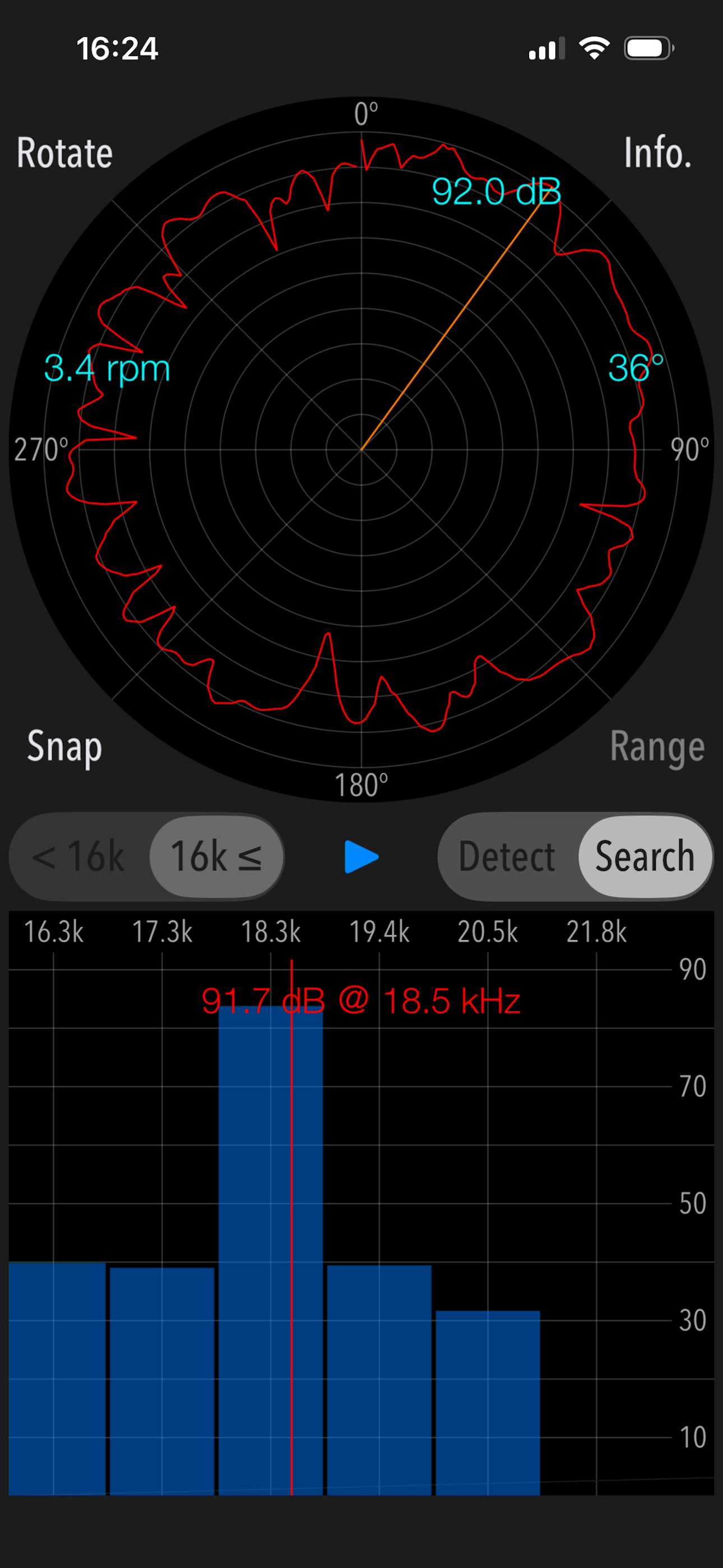
Two operating modes are available in this app, Detection Mode and Search Mode. Detection Mode can detect if there are high frequency noises and ultrasonic sounds. Search Mode can pinpoint the direction of high frequency sound sources.
Features:
- Detection of high frequency sound and ultrasonic wave, display of the peak frequency of the highest level.
- Search for sound source direction: 360 degrees horizontally
- Detectable frequency range: 8 kHz - 16 kHz / 16 kHz - 23 kHz (2 band division)
- Function to switch the gain range: 0dB - 100dB / -10dB - 90dB / -20dB - 80dB (in Detection Mode)
- Measurement screen rotation function (Rotate)
Operating procedure:
1) Selection of detectable frequency band
Select the frequency band as more than 16kHz or less than 16kHz.
2) Selection of Operational mode
- Detection Mode (Detect)
It finds an inaudible high frequency and ultrasonic sound in the frequency band more than 16 kHz (or less than 16 kHz).
Tap START button and it starts the detection function. If high frequency or ultrasonic sound exist, it will be displayed on the graph as the peak frequency. You can make the graph display easier to see by switching the gain range.
- Search Mode (Search)
It finds the direction of occurrence of the high-frequency sound source that detected the peak frequency. Search mode can be used only when high frequency or ultrasonic sound is founded in Detect mode.
Please make sure to hold the bottom built-in microphone of iPhone so that it faces outward. If you measure with the microphone facing inward, microphone sensitivity will deteriorate, and accurate measurement will not be possible.
Tap Start button, and firmly hold the iPhone terminal, please turn slowly clockwise. Recommended that the time required for a rotation is about 15 seconds and the rotation speed in the graph is approximately 4 rpm.
The measurement is completed by one revolution, and the signal strength of the peak frequency is displayed on the pie chart. You can find approximate direction of the high-frequency sound source relative to your standing position.
3) Snapshot
Measurement results can be saved as image files in “Photos,” and a timestamp is embedded in the image.
Note:
If the frequency changes periodically or randomly, it is not possible to determine the direction of occurrence in "Search".
Ultrasonic measurement depends on the sensitivity characteristics of the built-in microphone, so the measurement result may vary.
Peak frequency measurements (dB) conform to general noise levels.
Remarks:
It is still under study about health effects on human body by listening to high frequencies including ultrasonic sound. If the high frequency noise of high level is detected daily, we recommend that you consult an expert.
Please visit our iOS App Support page for more information on this app.
Store Rank
The Store Rank is based on multiple parameters set by Google and Apple.
All Categories in
United States--
Utilities in
United States#81
Top Competitors & Alternative Apps
Apps with a high probability of being used by the same users, from the same store.

Infrasound Recorder

Microwave Leak Detector

Decibel Pro: Sound Level Meter

SmarterNoise Pro
 Mosquitone Detector VS.
 May 3, 2026