

Calc Cloud vs Rolled Paper Calculator Uso & Estadísticas
Calc Cloud stores paper tape histories in Apple’s iCloud Drive® online services for use by any of your devices. Enter tabulations on your iPad® at work, and see them at home on your iPhone® that evening! Files are never lost even if you upgrade or lose your mobile device.
It is also perfect for everyday use. Use it for adding columns of numbers, invoicing, point-of-sale receipts, income taxes, percentages, and much more.
Print the paper tape history or export to iBooks®, DropBox®, Email or Printer (see the FAQs).
Review & edit numbers, add or delete lines and place comments on any lline.
The iPad version features a full sized (1:1) keypad with TypeTone, a unique audio aid to help guide your finger back to the center of a key.
This free download has limited lines of paper tape history, limited disk storage, and banner ads. Use one simple In-App Purchase for more lines of paper tape, storage files and the removal of banner ads.
==========
CPA's and Accountants: Please find 'Adding Machine: 10 Key Calc Universal' by Richard Silverman in the App Store which is a 10-key compliant adding machine with reverse numeric/operator entry like Casio, Sharp or Canon.
Recent Press for our 'Accountant' series of calculator apps:
. Recently ranked in "Top 10 - Finance" in the App Store.
. AppsWild.com: "Whether you're tracking your monthly budget, coming up with an estimate of costs for a project you're working on....this App should be your first choice."
==========
About Calc Cloud:
========
. Never lose a paper tape history again!! Keep all your devices up to date with paper tape histories held in iCloud Drive® online services.
. Universal App for iPhone & iPad devices
. Freely chain + - x / % 1/x √
. Tax + / - keys for Point-of-Sale receipts
. Print, email or export a PDF file to the iBooks® app, Dropbox(c) or your favorite printing utility.
. Add comments
. Add, delete and modify lines and recompute results automatically.
. 350 lines of paper tape history (upgraded version)
. Undo / Redo
. Three display formats: fixed, fix+, float
. Comprehensive set of help screens.
. Realistic keypad sounds
iPad Features:
========
. TypeTone(c) - a major innovation to aid accurate key entry using audio feedback.
. Full size (1:1) realistic keyboard.
. 4 Orientations
. Lock keypad for left or right handed use
iPhone Features:
========
. Multiple keypads
. Select from 4 background colors
. Set a paper tape font size
==========
FAQs
Q1. Can I touch-type?
A1. The iPad version of this app. has several aids for touch-typing: TypeTone variable audio feedback, 1:1 scale keyboard, or, scale and reposition the keyboard to fit your hand best. There is also support for right and left-handers.
Q2. How do I edit an incorrect number or add & delete lines from the paper tape?
A2. Touch any line of the paper tape to go into edit mode. Touch the side controls: Add Line, Delete Line. You can also edit numbers, and split groups. Press Done to return to Calculator mode.
Q3. Tell me about Email & Printing.
A3. From the Export dialog, select: Email, Print, Copy or Open-In. Email includes a pdf attachment. Print to an AirPrint capable printer. Open-In will show a menu of 3rd party Apps that can receive a hardcopy of your paper tape (iBooks, DropBox, or 3rd party printer Apps (Brother, HP and more)).
===========================
IN-APP PURCHASE:
. Free download has a limited number of lines of paper tape
. Upgrade for 350 lines of paper tape history, more file storage, & no ads
IN-APP PURCHASE DETAILS
. Payment will be charged to your iTunes account at confirmation of purchase.
TERMS AND CONDITIONS
Your use of this application is governed by Interlocken Technology's Terms of Use (http://s354819480.onlinehome.us/InterlockenPrivacyPolicy/Interlocken%20Technology%20Privacy%20Policy.pdf) and Privacy Policy (http://s354819480.onlinehome.us/InterlockenPrivacyPolicy/InterlockenTechnologyTermsOfUse.pdf)
- App Store de Apple
- Gratis
- Finanzas
Clasificación de tiendas
- -
~ An Innovative, User-Friendly Calculator with History ~
Selected as one of AppBank's Best iPhone Apps of 2010, this calculator is highly regarded by many users. It makes daily calculations easier and more accurate.
Use cases: Calculating expenses while shopping, double-checking household finances, calculating business expenses, learning tool for students, etc.
Main Features:
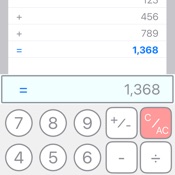
1. Scrolling Paper Display
Displays calculations like a scroll, allowing you to check your work anytime. Easily review past calculations by scrolling.
2. Standard/Advanced/Note Keyboard Switching
Equipped with three keyboard modes: Standard, Advanced, and Note. Easily switch between modes based on user preference and calculation needs.
- Standard: Provides simple, easy-to-use basic calculator functions
- Advanced: Extended keyboard with more advanced features
- Note: Offers note-taking functionality to save and manage calculation results
3. Flexible Decimal Point Modes
Three decimal point modes:
- F (Free): No limit on decimal places
- 0 (Zero): Displays integers only
- 2 (Euro mode): Displays up to two decimal places
Easily switch using the "dp/VAT" button (Advanced mode).
4. VAT Calculation Feature
Long-press the "dp/VAT" button in Advanced mode to set the VAT rate. After setting, simply switch to +VAT mode using the "dp/VAT" button to automatically add tax to calculations.
5. Scan Function
Use the "SCAN" button in Advanced mode to scan numbers from receipts or price lists for automatic input. Especially useful for accurately entering large numbers for tax returns.
6. Advanced Calculation Features
- Square root calculation: Easily calculate square roots with the "√" button.
- Sign inversion: Switch between positive and negative values with the "±↻" button.
- Backspace function: Delete the last digit in case of input errors (Advanced mode).
- Restore function: Restore deleted numbers (Advanced mode).
- C/AC function: Press "C/AC" to reset current input or calculation results. Long-press to clear all scroll content and choose whether to save as a note.
7. Copy Function
Copy calculation history displayed on the scroll to the clipboard using the "copy" button in Advanced mode.
8. Total Calculation Function
The "=/Σ" button displays normal calculation results. In Advanced mode, long-press to calculate the sum of all results displayed on the scroll.
9. Note Function
Save calculation results as notes for later reference or editing. Saved notes are grouped by date for easy management. Create notes by:
- Long-pressing the "C/AC" button to clear all scroll content and save as a note.
- Creating or editing notes in Note mode.
10. User-Friendly Interface
- Intuitive operation
- Clear display
- Dark mode support
- Easy switching between Standard/Advanced/Note modes
11. NoteToCalc Function
Import saved note content directly into the calculator. Main purpose: Record unit prices as memos without using the calculator function, then perform batch calculations later.
12. All Sum Function
After importing note content using NoteToCalc, long-press the "+/sum" button in Advanced mode to automatically calculate the sum of all imported values.
Compatible Devices
Available on iPhone, iPad, and Mac (Apple Silicon). Provides layouts optimized for each device's screen size.
- App Store de Apple
- Gratis
- Finanzas
Clasificación de tiendas
- -
Calc Cloud frente a Rolled Paper Calculator: comparación de la clasificación
Comparar la tendencia de clasificación de Calc Cloud en los últimos 28 días con Rolled Paper Calculator
Rank
Comparación de las clasificaciones Calc Cloud frente a Rolled Paper Calculator por países
Comparar la tendencia de clasificación de Calc Cloud en los últimos 28 días con Rolled Paper Calculator
Todas las categorías
Finanzas
Compara con cualquier sitio gracias a nuestra prueba gratuita
 Calc Cloud VS.
  Rolled Paper Calculator
enero 11, 2026