

Análisis de la app Transfer My Data - Phone Clone para 23 de diciembre

Transfer My Data - Phone Clone
- Codix Apps
- Google Play Store
- Gratis
- Herramientas
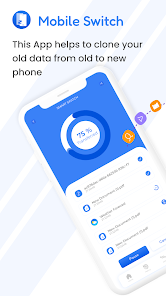
Transfer My Data - Phone Clone allows you to easily copy your data from one device to another with copy my data app, users can transfer their personal data, settings, and apps with minimal effort. Transfer My Data - Phone Clone mobile transfer is very useful when upgrading to a new device or when switching between devices, as it eliminates the need to manually transfer files, settings, and apps one by one.
To Clone Phone, both devices must be connected to the same Wi-Fi network and then use the Transfer My Data - Phone Clone feature found in the settings of the new device. This can include various types of information such as photos, music, videos, and other file formats, as well as settings like Wi-Fi network configurations, custom wallpapers, and app data.
Features of Transfer My Data - Phone Clone :
● Transfer of calendar events, and photos between devices.
● Data transfer over Wi-Fi.
● A user-friendly interface that guides you through the process of transferring data.
● The ability to select which data types to transfer.
● Easy and fast data transfer.
● Support for multiple types of data like photos, music, videos, documents, and more.
● Security and encryption options to protect data during transfer.
● One-click data transfer.
● Smart Select feature to quickly select which data to transfer.
How to use Transfer My Data - Phone Clone :
To use the Smart transfer app to copy your data from one device to another, you will need to have both devices connected to the same Wi-Fi network. Here are the basic steps:
1. On the device that you want to transfer data FROM, open the Transfer My Data - Phone Clone mobile and select the "Send" option.
2. On the device that you want to transfer data TO, open the Transfer my Data app and select the "Receive" option.
3. On the sending device, select the data that you want to transfer. This may include photos, videos, and more.
4. On the receiving device, confirm that you want to receive the data.
5. The devices will now connect and begin the transferring of data. The amount of time it takes will depend on the amount of data being transferred.
Smart transfer app and content transfer are used to transfer data between devices.
A Transfer My Data - Phone Clone with content transfer capability allows for seamless and effortless transfer of data from your old device to your new one. Whether it's important documents, precious photos, or favorite music, a phone replicate or transfer content app ensures that your content is quickly and securely transferred without any loss or damage. This feature makes it easy to upgrade to a new device without worrying about losing any important information. Plus, with content transfer, you can do the data transfer in a simple and convenient way, avoiding complicated and time-consuming setup processes.
Copy my data app is a great way to quickly transfer your data from one device to another, saving you time and effort.
Disclaimer:
This app is not related to smart switch. Your privacy and security are of the utmost importance to us, and we assure you that any permissions we have obtained are solely for the purpose of providing you with a superior service.
Clasificación del uso de Transfer My Data - Phone Clone
El rango de uso se basa en el algoritmo de Similarweb que calcula las instalaciones actuales y los usuarios activos durante un periodo de 28 días.
Todas las categorías en
Brasil--
Herramientas en
Brasil--
Intereses de los usuarios & Top categorias
Principales categorías y aplicaciones utilizadas por los usuarios de Transfer My Data - Phone Clone.
Categorías principales
Afinidad
Principales aplicaciones de la categoría
51%


32%



12%



5%

Principales competidores & aplicaciones alternativas
Aplicaciones con una alta probabilidad de ser utilizadas por los mismos usuarios, desde la misma tienda.

Phone Clone Tool: Switch data

Smart Transfer: File Sharing

Transfer All Data - PhoneClone

Data Transfer - MobileTrans
 Transfer My Data - Phone Clone VS.
 23iciembre d, 2025