

Análisis de la app Screenshot - Screen Capture para 23 de diciembre

Screenshot - Screen Capture
- Futuretech Apps
- Google Play Store
- Gratis
- Herramientas
Screenshot - Screen Capture, Webpage Shot & Image Editor
Looking for the fastest and easiest way to capture your screen? 📸
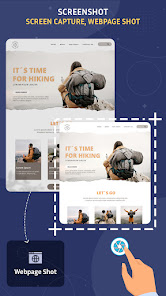
Screenshot - Screen Capture is a powerful yet lightweight screen capture app that lets you take high-quality screenshots, capture webpages, and edit images instantly—perfect for everyday use or professional needs.
✨ Key Features:
✅ One-Tap Screenshot
Capture your screen with a single tap using the floating button or notification bar shortcut. No root required!
✅ Webpage Screenshot (Full Page)
Capture full or partial web pages in high resolution—ideal for saving articles, chats, and documents.
✅ Floating Button & Overlay Tool
Access the screenshot feature anytime with our easy-to-use floating control—perfect for gamers, students, and professionals.
✅ Edit Captured Screenshots
Crop, add text, draw shapes, insert emojis, and apply image filters—turn basic screenshots into shareable content in seconds.
✅ Save in JPG or PNG Format
Choose your preferred image format and quality level to save space or preserve detail.
✅ Built-in Screenshot Gallery
View, manage, and share all your screenshots from one organized place.
✅ Share Instantly
Quickly share your screenshots via WhatsApp, Instagram, Gmail, or any app you choose.
Why Choose Screenshot - Screen Capture?
✔ Fast screen grabber with clean UI
✔ Lightweight and battery-friendly
✔ Works on all Android devices
✔ Supports scrolling screenshot for full-page capture
✔ Optimized for Android 13 & above
📲 Whether you're a content creator, student, gamer, or casual user—Screenshot - Screen Capture is your ultimate tool for grabbing, editing, and sharing screen content with ease.
🔽 Download now and start capturing your screen smarter & faster than ever!
Clasificación del uso de Screenshot - Screen Capture
El rango de uso se basa en el algoritmo de Similarweb que calcula las instalaciones actuales y los usuarios activos durante un periodo de 28 días.
Todas las categorías en
Estados Unidos--
Herramientas en
Estados Unidos--
Intereses de los usuarios & Top categorias
Principales categorías y aplicaciones utilizadas por los usuarios de Screenshot - Screen Capture.
Categorías principales
Afinidad
Principales aplicaciones de la categoría
33%

30%

26%

11%
Principales competidores & aplicaciones alternativas
Aplicaciones con una alta probabilidad de ser utilizadas por los mismos usuarios, desde la misma tienda.

Edge Lighting Clock Light

NutraBio Brands

DT Driver
 Screenshot - Screen Capture VS.
 23iciembre d, 2025