

You’ve hit your search limit
Start your free trial to keep exploring full traffic and performance insights.
Get StartedAnálisis de la app Hyundai Bluelink para 7 de enero

Hyundai Bluelink
- Hyundai Motor India Limited
- Google Play Store
- Gratis
- Estilo de vida
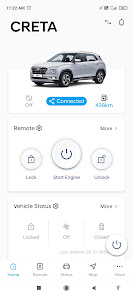
Hyundai Bluelink is an application for customers who subscribes to Hyundai Motors connected car services and is offered free of cost for the first 3 years of ownership.
※ Key Features include
1. Remote control
- Remote Engine Start/Stop, Remote Door Lock/Unlock, Remote Horn+ Lights(Electric vehicles provide remote functions specialized in electric vehicles.)
- Vehicles' engine can be started remotely for a maximum time of 10 minutes and along with it, in vehicle climate can also be set from the app.
- Bluelink helps you to be keep updated about your vehicle status like Doors/Trunk and Hood Status, Engine Status, Climate Status and Fuel Level, Low Tyre pressure indication (if equipped)
2. Location based services
- You can keep track of your car's location using Find my car and Live car tracking features.
3. Security Services
- Bluelink notifies you in case someone s trying to intrude into your vehicle
- With the help of call center, Bluelink users can remotely track and immobilize the engine, in case of theft
4. Safety Services
- In case of any Emergency , Call center will assist you at the touch of a button on the room mirror
- In case of any mishap, an auto call will be initiated to your infotainment system and call center will assist you with the emergency services
- Panic notification to emergency contacts on pressing the Panic button on the FOB key
5. Alert Services
- Now monitor your vehicle remotely with alert services like Geo-Fence, Time-Fence, Speed, Valet and idle alerts
6. Auto Healthy Air (if equipped)
- Turn ON the in-car air purifier remotely with remote start and also monitor your in-car's Air Quality status from the mobile app
7. Remote Seat Ventilation Control (if equipped)
- Remotely Turn ON the Seat Ventilation while remote engine start and also check the status of seat ventilation from the app
8. Pro-active vehicle status alert
- A smart alert that notifies you if you left the door unlocked/open while leaving the vehicle
9. Destination Transfer
- You can search for destinations and send searched destination information to your vehicle.
10. My account
- Check account information and provide logout capabilities.
11. Push Notification Settings
- Push notification ON/OFF can be set.
12. Notification Message Box
- You can check the control history inquiry and notification messages received.
■ Guidance on the authority and purpose of using the Bluelink app
- Phone (required): Connecting a phone when using the location search service
- Location (optional): Check parking location / Send destination Check user location
- Storage (required): Download images around my car, content
- Calendar (optional): Use calendar destination interworking service
- Camera (optional): Set profile picture and use AR guidance function for parking location
- File and media (optional): Profile picture settings
※ You can use the service except for those features even if you do not agree to the optional access rights.
※ Access rights are implemented for Android OS 8.0 and later, divided into required and optional privileges.
[Wear OS description]
First, log in to the Bluelink Android APP and select your vehicle from the vehicle list screen. If you connect with the Bluelink Wear OS without logging into the Bluelink Android APP or selecting a vehicle, a communication error will occur. go to "App Settings" in the More tab of the Bluelink Android app and enable "Link Smart Watch". Connecting with Bluelink Wear OS without this feature enabled will result in a communication error.
* Bluelink Wear OS provides remote control and status checking features depending on your vehicle options.
[Smartwatch model that supports Bluelink service]
- Samsung Galaxy Watch (42/46 mm)
* Supports Android OS 8.0 or later,Wear OS 2.0 or later.
*The Tizen Watch has been discontinued due to Samsung's service outage.
Clasificación del uso de Hyundai Bluelink
El rango de uso se basa en el algoritmo de Similarweb que calcula las instalaciones actuales y los usuarios activos durante un periodo de 28 días.
Todas las categorías en
Estados Unidos--
Estilo de vida en
Estados Unidos--
Principales competidores & aplicaciones alternativas
Aplicaciones con una alta probabilidad de ser utilizadas por los mismos usuarios, desde la misma tienda.

Indian Motorcycle®

Fleetio Go - Fleet Management

Auto Agent

Harley-Davidson
 Hyundai Bluelink VS.
 enero 7, 2026