

Análisis de la app KTbsa para 10 de diciembre

KTbsa
- KocaTurk Watch Faces
- Google Play Store
- Pagado
- Personalización
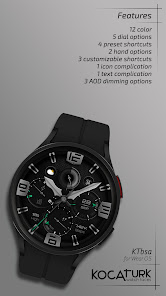
KTbsa is a analog watch face for Wear OS.
* Displayed data;
- time
- am/pm
- date
- heart rate, progress and zone
- steps and progress
- battery and progress
* Preset shortcuts;
- battery
- steps
- heart rate
- calendar
* Complications and shortcuts;
- 4 shortcut (no image)
- 1 text complication
- 1 icon complication
* Customization options;
- 12 color palettes
- 2 hands
- 5 dial options
- AOD dim out options (60%/80%/100%)
* Note for customization;
There may be delays and glitches during customization with the wearable app.
Therefore, make personalization settings on your watch.
1. Press and hold in the middle of the watch screen.
2. Tap the Customize button.
3. Swipe left or right to navigate between customizable elements.
4. Swipe up or down to change colors or options for each element.
ATTENTION:
SQUARE WATCH MODELS ARE NOT CURRENTLY SUPPORTED! Also, some features may not be available on all watch models.
INSTALLATION NOTES:
1- Click on the arrow to the right of the Buy button and make sure your watch is selected from the devices listed in the drop-down menu.
After the download is complete;
2- If you did not select your watch during the installation, a second installation option, "Companion App", will be installed on your phone. Open this application and tap on the image, then you will see the play store download screen on your watch. Check if the download has started.
After the download is complete;
Go back to the home screen of your watch and long-press the screen. On the watch face selection screen, click on the "add" option on the far right and find and activate the watch face you purchased.
Note: Don't worry if you get stuck in the payment loop, only one payment will be made even if you are asked to make a second payment. Wait 5 minutes or restart your watch and try again.
There may be a synchronization problem between your device and Google servers.
Please note that the issues on this side are not caused by the developer. The developer has no control over the Play Store on this side.
Thank you!
Follow us on social media for discounts and promotions.
Facebook: https://www.facebook.com/koca.turk.940
Instagram: https://www.instagram.com/kocaturk.wf/
Telegram: https://t.me/kocaturk_wf
Clasificación del uso de KTbsa
El rango de uso se basa en el algoritmo de Similarweb que calcula las instalaciones actuales y los usuarios activos durante un periodo de 28 días.
Todas las categorías en
Estados Unidos--
Personalización en
Estados Unidos--
Principales competidores & aplicaciones alternativas
Aplicaciones con una alta probabilidad de ser utilizadas por los mismos usuarios, desde la misma tienda.

DF034

KTma

Warrior

smo Analog Tough101A
 KTbsa VS.
 10iciembre d, 2025