

You’ve hit your search limit
Start your free trial to keep exploring full traffic and performance insights.
Get StartedAnálisis de la app VirtualTablet Lite (S-Pen) para 2 de febrero
VirtualTablet Lite (S-Pen)
- Sunnysidesoft
- Google Play Store
- Gratis
- Herramientas
*** If you have a tablet/phone device, you can draw on your PC with VirtualTablet!***
*** If you have Galaxy Note Series with S-Pen, you can draw with pressure sensitivity!***
*** Additional server program(can be downloaded from http://www.sunnysidesoft.com/virtualtablet) should be running on your PC(support both Windows & Mac) to use this app***
** VirtualTablet Lite version with AD is also available in store **
** You can buy the full version of VirtualTablet with no Ad in the store **
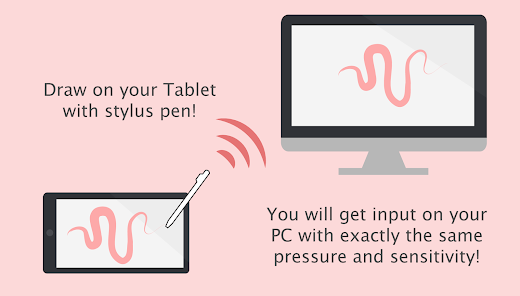
Turn your tablet device into wireless digitizer!
Run this app on the tablet device with stylus pen support. If VirtualTablet Server program is running on your PC, you can seamlessly transfer your input to your PC like you use real digitizer H/W. You can download the VirtualTablet Server program free of charge from http://www.sunnysidesoft.com/virtualtablet
You don't need to buy real digitizer (such as Wacom Tablet) for your desktop anymore.
If you wanna draw with your stylus pen, download VirtualTablet now!
Turn your tablet device into cool wireless digitizer with this app.
[Detail Features]
- USB & Bluetooth & WiFi connection mode
- Left/Right handed mode
- Tablet size adjustment
- Support all input mode of S-Pen like stylus.(in-range hover movement, barrel button, eraser tip, and etc.)
- Support drawing with finger or capacitive stylus as well.
- Automatic server discovery in the same WiFi network.
[Things You Can Do with this App]
- Draw with your stylus pen on canvas of any graphics applications in your PC. Enjoy drawing with brush tools using your stylus! (Works well with Adobe Photoshop, Illustrator, Animate, Sketchbook Pro, and etc).
- Remotely control your PC with stylus pen or finger (same as remote mouse).
- Make a hand writing annotation on your PC's PDF viewer.
Clasificación del uso de VirtualTablet Lite (S-Pen)
El rango de uso se basa en el algoritmo de Similarweb que calcula las instalaciones actuales y los usuarios activos durante un periodo de 28 días.
Todas las categorías en
Estados Unidos--
Herramientas en
Estados Unidos--
Principales competidores & aplicaciones alternativas
Aplicaciones con una alta probabilidad de ser utilizadas por los mismos usuarios, desde la misma tienda.

touchnotes

PENUP – Drawing-sharing SNS

Bamboo Paper

Noteshelf - Notes, Annotations
 VirtualTablet Lite (S-Pen) VS.
 febrero 2, 2026