

Análisis de la app VT View Source para 4 de diciembre
VT View Source
- Vagharshak Tozalakyan
- Google Play Store
- Gratis
- Herramientas
This application can be used to view the HTML, CSS, JavaScript or XML sources of webpages and remotely located files.
It supports different syntax highlighting themes, adjustable colors, line numbers, text wrapping, in-source active links, mobile and desktop browser modes and other features.
The source code can be opened by typing the URL address or using "Share page" functionality of device browser (native Android browser, Opera Mobile, Dolphin, Chrome, Firefox, etc.).
VT View Source is free with no ads.
Please see the feature list below for details.
HOW TO USE
Option 1: Browse for the webpage in your favorite phone browser, then select "Share page" command from your browser's menu and tap on "VT View Source" in the list of applications you can share the link with.
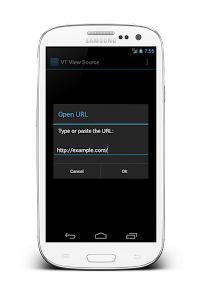
Option 2: You can also use application by specifying the URL address directly. Go to Menu->Open URL and type or paste the webpage address or CSS/XML/JavaScript file address.
FEATURES
View (X)HTML, XML, CSS and JavaScript sources. Currently supports the following MIME types: "text/html", "text/x-server-parsed-html", "application/xhtml+xml", "application/xml", "text/sgml", "text/x-sgml", "text/plain", "text/css", "text/xml", "application/rss+xml", "application/rdf+xml", "application/atom", "text/javascript", "application/x-javascript", "application/javascript", "text/ecmascript", "application/ecmascript", "text/jscript", "text/vbscript", "image/svg+xml".
Open source code by typing or pasting the URL address.
Open source code using "Share page" functionality of device browser (native Android browser, Opera Mobile, etc.).
Syntax highlighter with more than 35 predefined themes.
Syntax highlighter can be disabled for best performance.
Show/hide line numbers in syntax highlighter mode. Line numbers are shown as they appear in target source - text wrapping will not increase line numbers.
Adjustable background color.
Adjustable text color for highlighter disabled mode.
Adjustable default font size.
Support of text wrapping to fit the device screen width.
Support of text zooming.
Search in source code functionality.
Option to make links appeared in source code clickable. Can handle most of absolute and relative URLs, email addresses, HTML links, JavaScript and CSS links.
Can open inner links in source view mode (if supported) or in default device browser.
Copy unformatted source code to clipboard (for further paste and edit in external editor).
Share unformatted source code with other applications.
Save unformatted source code to local file system.
Optional Desktop Browser Emulator mode allows to read the content of remote webpages as a regular desktop browser. This mode is useful when webpage has different markup depending on mobile or desktop browser.
Bookmarks support.
Support of Internationalized Domain Names (.рф, .中国, بھارت. etc.) in Android 2.3 (Gingerbread) and higher.
Show request and response HTTP headers.
Free, with no ads.
ISSUES AND LIMITATIONS
===============
Read this before rating negative.
- Currently supports only UTF-8 encoding for non-English content.
- Internationalized Domain Names are not supported in Android 2.2 (Froyo), please use Punycode instead.
- Cannot read password protected pages.
- When sharing pages with the content based on cookie or session state, the source code may not be the same as in device browser.
- Cannot read local files (e.g. read via "file:///" protocol).
- It is not possible to edit source code directly in application. However, you can use "Copy All" menu item to copy unformatted source code and paste in external text editor or you can use "Share" or "Save File" menu items.
If you meet problems using this app, please inform me details. I'll try to fix ASAP.
PLEASE BE AWARE: This application requires INTERNET permission to access remote pages and WRITE_EXTERNAL_STORAGE permission to save source codes locally.
Please rate to support further development. Report bugs or send feature requests to vaghdesirez@gmail.com
Clasificación del uso de VT View Source
El rango de uso se basa en el algoritmo de Similarweb que calcula las instalaciones actuales y los usuarios activos durante un periodo de 28 días.
Todas las categorías en
Estados Unidos--
Herramientas en
Estados Unidos--
Principales competidores & aplicaciones alternativas
Aplicaciones con una alta probabilidad de ser utilizadas por los mismos usuarios, desde la misma tienda.

Dot Conner: Webtective

RealVNC Viewer: Remote Desktop

Loom – Screen and Cam Recorder

Liner: AI Search with Sources
 VT View Source VS.
 4iciembre d, 2025