

Análisis de la app Widget iOS 16 - Color Widgets para 4 de diciembre

Widget iOS 16 - Color Widgets
- Mobile Smart Growth
- Google Play Store
- Gratis
- Estilo de vida
Bored with the same old phone? Meet Color Widgets—the #1 worldwide Home Screen Manager with Lock Screen Widget, one click to satisfy all your fantasies!
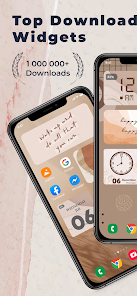
Color Widgets allows you to freely add stylish widgets and customize the home screen! We got cool widgets, themes, keyboards, fonts and charging animations that are really beautiful!
Widget iOS 16 makes adding aesthetic and handy widgets to your home screen easy. Choose from stunning predesigned widgets or, better yet, create your own with the easy-to-use widget editor. Browse dozens of widget types like photo, countdown, date and battery, weather, quotes, and many more.
Widget iOS 16 - Color Widgets allows you to add Widgets with 3 sizes: small, medium and large. Comes with many beautiful fonts, font colors, backgrounds, or you can add your favorite background images in your phone.
Try the new aesthetic refreshing look of iOS 16 on your Android smartphone, with all the widget for iOS 16.
As the organizer of the home screen, Color Widgets can greatly improve the convenience of using iPhone and provides you with all-in-one services!
There are 2000+ icons, 5000+ widgets and 200+ themes including various aesthetic wallpapers as you choose!
With Color Widgets, you can enjoy widgets, icons, wallpapers and exclusive keyboard themes on iOS 16 and decorate your home screen!
WIDGET iOS 16
Customize each widget to perfection. Add pictures to your widgets, edit their font, create your own color-scheme, and so much more. Frequent updates constantly add new widgets you'd love. With Color Widgets, there are no limits to customizing your Home Screen! Here’s a glimpse of our widgets:
● Aesthetic
● Black
● Time, Date & Battery
● Countdown
● Daily, Hourly, & Current Weather
● Music & Playlists
● Calendar
● Analog Clock
● Quotes & Custom Text
● Reminders
● Step Count/Pedometer
● Sunset & Sunrise
● Neon
and more
How to use Color Widget
1. Click on your favorite widget category
2. Click Set Widget
3. Go to your phone screen
4. Press and hold until the widget pops up
5. Go to the widget and select ("2 × 2"), ("4 x 2") or ("4 x 4")
Your favorite widgets will appear on your phone and no more watermarks on each icon
Photo widget is available on your home screen as well. You can decorate your home screen with your favorite photos, such as exciting moments, favorite idols or your cute pet, etc. You can also add your favorite text on the home screen like inspiring sentences. It can also be used as notes, as you can add reminders of important events or even words that are difficult to remember. Use it according to your needs!
Along with many more widgets to discover.
Enjoy WIDGET iOS 16 for free
We are also looking for your feedback, suggestion, or recommendation. Please, feel free to let us hear from you at your review so we can continue to bring you the best experiences and updates these Widget iOS 16 - Color Widgets app.
Note:
If the widgets are not refreshing on your phone, go to Settings in the app > enable the "Allow Apps to run in the background" option.
Clasificación del uso de Widget iOS 16 - Color Widgets
El rango de uso se basa en el algoritmo de Similarweb que calcula las instalaciones actuales y los usuarios activos durante un periodo de 28 días.
Todas las categorías en
Estados Unidos--
Estilo de vida en
Estados Unidos#3,243
Intereses de los usuarios & Top categorias
Principales categorías y aplicaciones utilizadas por los usuarios de Widget iOS 16 - Color Widgets.
Categorías principales
Afinidad
Principales aplicaciones de la categoría
27%

15%



12%

9%

Principales competidores & aplicaciones alternativas
Aplicaciones con una alta probabilidad de ser utilizadas por los mismos usuarios, desde la misma tienda.

Olympia - Cartoon Icons Pack

Lena Icon Pack Shapeless Icons
Fonty - Draw and Make Fonts

Pixelful - Icon Pack
 Widget iOS 16 - Color Widgets VS.
 4iciembre d, 2025